
Setting a welcome message on the login page
This page describes how to display a custom message on the login page of the S-Filer Portal web interface, for example a maintenance schedule or the contact information of your support team.
The following image shows the login page with a maintenance schedule added on the bottom of the page.
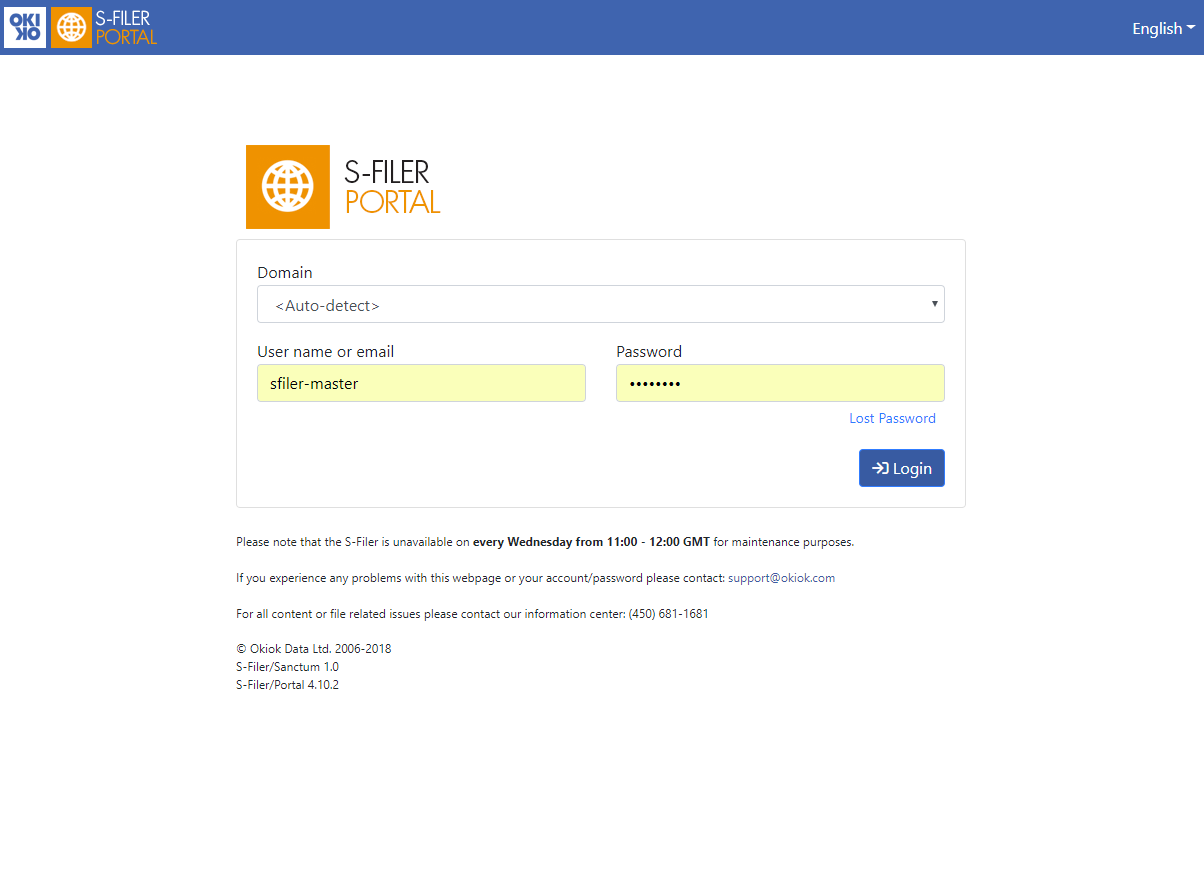
The message is defined in a message.jsp file located in the theme folder used by S-Filer Portal. There is one message.jsp file per language, under the message folder of the theme.
Important
Do not modify the default sfiler theme: it is replaced at each update of S-Filer Portal and your message would be lost. Start by creating your own theme — a copy of sfiler with its own name, selected in the User interface theme field of the notification theme — as described in Creating your own theme, then edit the message.jsp files of that theme.
For example, for a theme named mycompany:
- themes
  - mycompany
    - message
      - en
        - message.jsp
      - fr
        - message.jsp
      - es
        - message.jsp
      - de
        - message.jsp
      - it
        - message.jsp
The file of each language contains the message displayed when the interface is used in that language. By default, the message.jsp file of the en language contains a simple support contact example:
<%@ page contentType="text/html; charset=UTF-8" pageEncoding="UTF-8" session="false" %>
<%@ taglib prefix="s" uri="/struts-tags" %>

<div id="customMessage">
    If you experience any problems with this webpage or your account/password please contact: <a href="mailto:support@mycompany.com">support@mycompany.com</a>
</div>
In order to set a message, you need to replace the JSP's content with your own message. For example:
<%@ page contentType="text/html; charset=UTF-8" pageEncoding="UTF-8" session="false" %>
<%@ taglib prefix="s" uri="/struts-tags" %>

<div id="customMessage">
    Please note that the S-Filer is unavailable on <b>every Wednesday from 11:00 - 12:00 GMT</b> for maintenance purposes.
    <br/><br/>
    If you experience any problems with this webpage or your account/password please contact: <a href="mailto:support@example.com">support@example.com</a>
    <br/><br/>
    For all content or file related issues please contact our information center: (555) 555-1234
</div>
JSP page section description
These 2 first lines are mandatory:
<%@ page contentType="text/html; charset=UTF-8" pageEncoding="UTF-8" session="false" %>
<%@ taglib prefix="s" uri="/struts-tags" %>
You then need to add the custom message div:
<div id="customMessage">
  ...
</div>
Finally, the content of your message must be set inside the div. Remember to repeat the operation in the message.jsp file of each language supported by your installation, with the translated message.
If you need to adapt the CSS of this message, you may modify the CSS file called login.css located in the S-Filer Portal theme that is currently in use.
Example: /themes/mycompany/css/login.css
See Also
Your theme is carried over automatically when S-Filer Portal is updated, see Preserving your customizations during upgrades.