
S-Filer Portal™ is a complete solution that allows large and small organizations to meet all their enterprise needs for secure file transfer and storage.
OKIOK RELEASES VERSION 4.19.1 OF S-Filer Portal™ SECURE TRANSFER SOLUTION
Improvements
Export of “Basic” Configuration
What was previously described as “exporting the basic configuration” has been replaced with “exporting configuration”. Instead of generating an intermediate JSON file that must be injected into the component configuration file (gui.conf or sfiler.conf), the new process simply generates the final configuration. The extra step has been removed from the configuration process. The resulting file can now be used without any modification. This process only applies to on-premise customer, SaaS users do not have to maintain de connectivity between components and the S-Filer Portal Server.
./sfiler-config-cli.sh -l my-user -p my-password -cf “conf/sfiler.conf” export-config -n my-gui -ccf gui.conf
Component configuration file has been successfully saved to: gui.conf
Availability of Lightweight distributions
A new lightweight version of the various components is now available for those who have on-premise instances of the solution. This new distribution can be very useful if the solution needs to be containerized. A dedicated article is available for those who wish to take this new deployment approach.
Availability of new generic extensions
Two new extensions have been added :
- Generic Groovy Script
- Generic Native Command
The two new extensions behave in the same way as their previous counterparts, except that they do not decrypt the file at the start of their execution. They are useful if you wish to perform specific processing after an event has occurred in the application.
Better mobile device rendering
Improvements have been made to the web interface to render better on smaller interfaces. This has improved the usability of the web application on mobile devices.
Improved Quota visualization
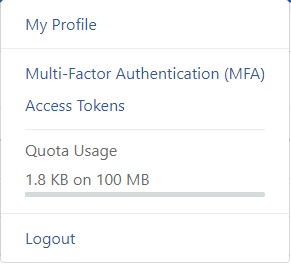
It’s now much easier to view users’ quota usage. Each user can now see their personal quota usage by clicking on their username in the top bar. Usage is divided into three sections: one showing “Quick Send Files”, another showing Inbox files and another showing files associated with their shares.
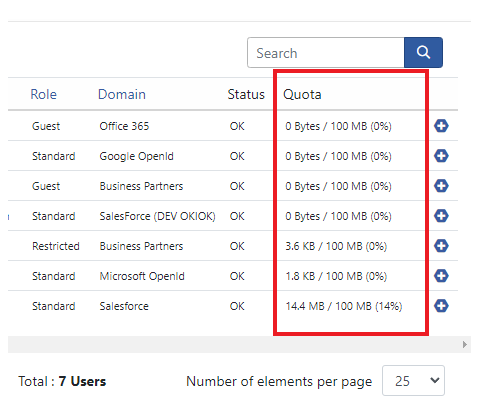
System administrators can also see the quota usage of application users. A new column is now available in the users list for this purpose.
Availability of new Audit Types
A new series of Audit Type were added and are now available in the report section. These new Audit Types are :
- 1.3.6.1.4.1.7660.50.1.2.12=Access token deleted
- 1.3.6.1.4.1.7660.50.1.2.13=MFA (TOTP) enrollment started
- 1.3.6.1.4.1.7660.50.1.2.14=MFA (TOTP) added
- 1.3.6.1.4.1.7660.50.1.2.15=MFA (TOTP) deleted
- 1.3.6.1.4.1.7660.50.1.2.16=SSH key added
- 1.3.6.1.4.1.7660.50.1.2.17=SSH key updated
- 1.3.6.1.4.1.7660.50.1.2.18=SSH key deleted
- 1.3.6.1.4.1.7660.50.1.2.19=Role updated
- 1.3.6.1.4.1.7660.50.1.4.8=Password policy (user) assigned to group
- 1.3.6.1.4.1.7660.50.1.4.9=Password policy (quick send) assigned to group
- 1.3.6.1.4.1.7660.50.1.4.10=Password policy (user) unassigned from group
- 1.3.6.1.4.1.7660.50.1.4.11=Password policy (quick send) unassigned from group
REST API modification
/queries/users/remaining-space
The result of the endpoint is now a structure that includes several values instead of a single integer value. The value now includes the “anonymous transfer” that were made
- Inbox size
- Share size
- Anonymous upload size
- Quota that applies to the user
- The total size (inbox, share plus anonymous upload)
Bug fixes
- The “hide-password” command of the admin-cli has been corrected.
- Improvements to the ICAP extension to better handle the scanning of very large file.
- Corrections to the date picker utilization in the community detail panel.
Known issues
This version introduced a problem with the Transfer Logging extension. Following migration to this version, the extension will no longer be functional. The fix is available in version 4.19.2 of the solution.
* This upgrade requires an update of the database. We strongly recommend that you perform a full backup of the solution prior to the upgrade. Do not hesitate to contact our support group if you have any questions regarding this upgrade at support@okiok.com