
RAC/M Identity™ is our simple and effective identity governance and administration (IGA) solution that enables large and small enterprises to understand and manage the complex relationships between users and their access to physical and digital resources, on-premise or SaaS.
Important new features
1. Provisioning Request Panel
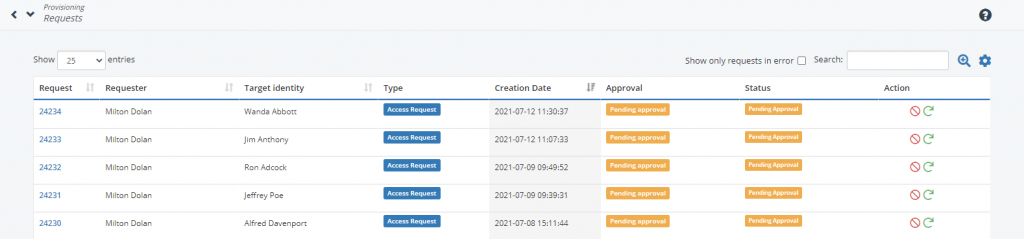
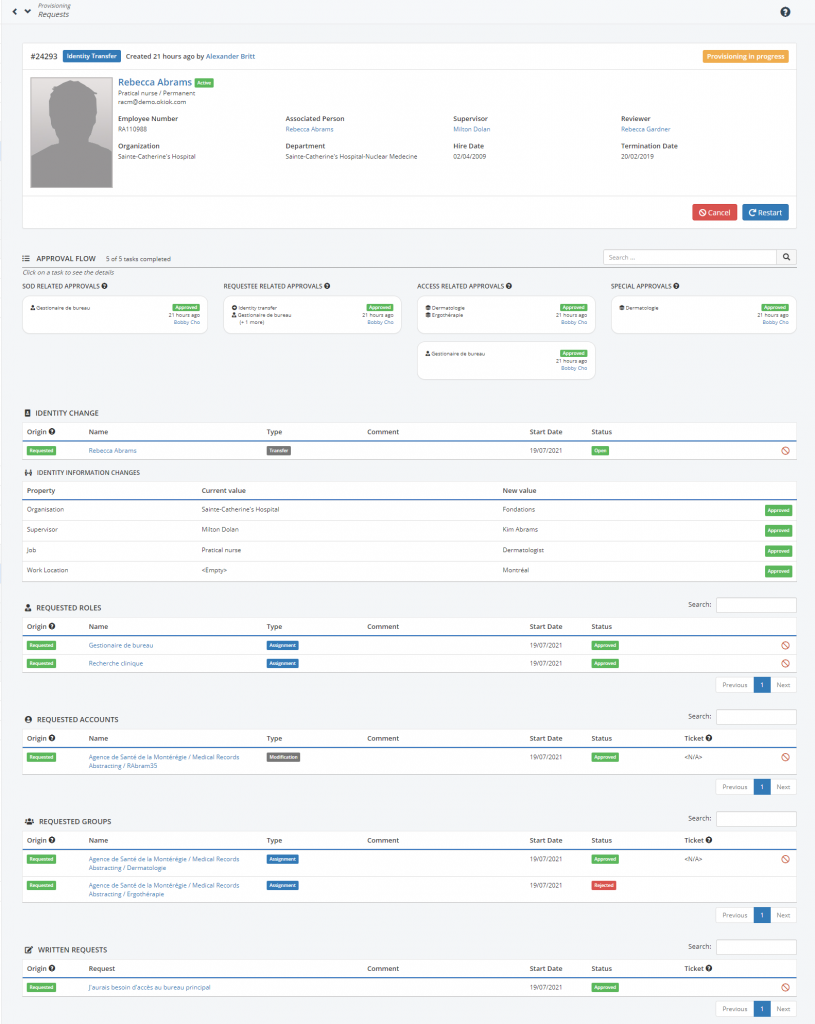
This panel provides a complete view of the tasks and provisioning associated with a request. It can be accessed in Admin mode from the new Provisioning -> Request menu as well as in Self-Service from the Requests panel.
2. Provisioning Panels
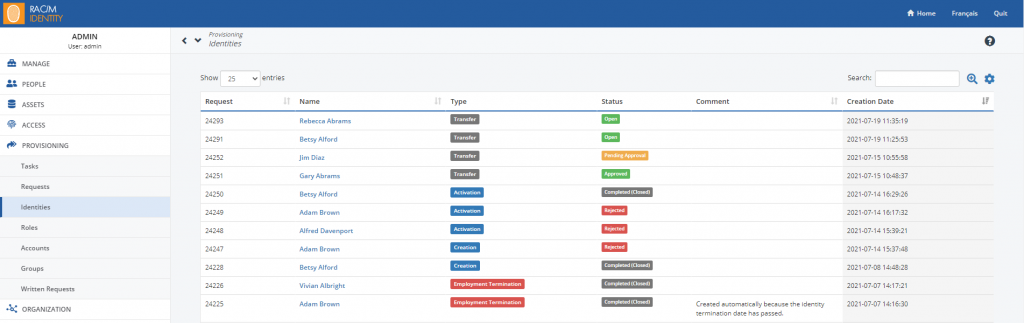
The different types of provisioning objects (Identity, Role, Account, Group and Written Request) now have their detail screen accessible from the new Provisioning menu.
3. Improved identity transfer functionality
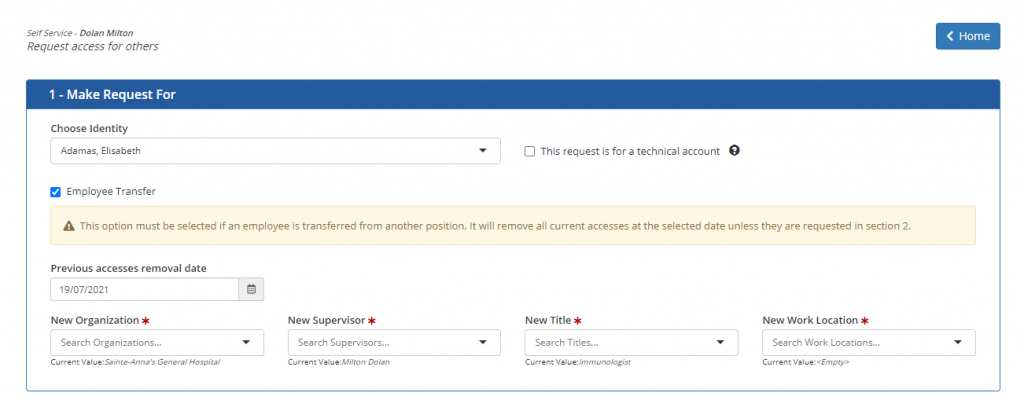
It is now possible to change some fields of an identity when requesting a transfer. The fields that can be changed are Organization, Supervisor, Employment, and Location of Employment. Changes will need to go through the approval process in order to be applied on the transfer date.
Improvements
- Self-Service
- All items in an access request are now associated to the same request #2507
- Added a search bar in the access requests allowing to search a request by identity or by creation date #2577
- Added a global approval status for a request #2529
- Added global provisioning status to a request #2530
- An auto-approved request is now created when a role modification is made from an Admin menu and when the ModuleHRTerminationDate module detects a departure that does not come from a Notice of Departure in the Self-Service #2521
Correction
- Granular approvals are now taken into consideration during the identity approval for an identity creation request #2606
- The “Identity related approval” configuration is now taken into consideration for an identity creation request #2606
- Fixed a display problem in the pagination of all lists introduced in version 3.12.0 #2566
- The asset is now correctly displayed in the details screen of a permission #2619
- Self-Service
- Various visual corrections in the “External contractor integration request” screen #2531
- The SOD description is now correctly displayed in an access request #2572
- Access review campaigns
- The “Pre-approved” filter no longer displays non-pre-approved items #2613
- Identity filters are now applied when the approver is a “Designated Approver” #2612
- In the email reminder template, it is now possible to put the campaign description in the subject #2429
- The generation of the campaign is now functional when the administrator of the campaign is also a approver #2616
- The creation of a campaign of type role content is now functional when it is created via the “Duplicate” button #2613
Breaking changes
- The All Tasks, Provisioning Requests and Role Tracking menus have been moved under the new Provisioning menu. In addition, they have been renamed to: Provisioning -> Tasks, Provisioning -> Accounts and Provisioning -> Roles respectively
- Renamed a substitution variable in the campaign email templates: campaignReviewerTitle becomes campaignReviewerName.
- Added 3 new required configurations in the config.properties file:
- # Enables the possibility to modify some fields when we do an employee transfer (true or false) self.service.transfer.modify_fields.enable=false
- # The type of identity that we can modify (See table [EMPLOYMENT_TYPE]. Leave empty to enable this for all employment types) self.service.transfer.modify_fields.employment_types=
- # The type of fields that can be modified, as of now, these are avaialable: ORGANISATION, SUPERVISOR, JOB and WORK_LOCATION. Leave empty to enable this for all field types. self.service.transfer.modify_fields.field_list=