
S-Filer Portal™ is a complete solution that allows large and small organizations to meet all their enterprise needs for secure file transfer and storage.
Okiok releases version 4.14.0 of S-Filer Portal™.
Features
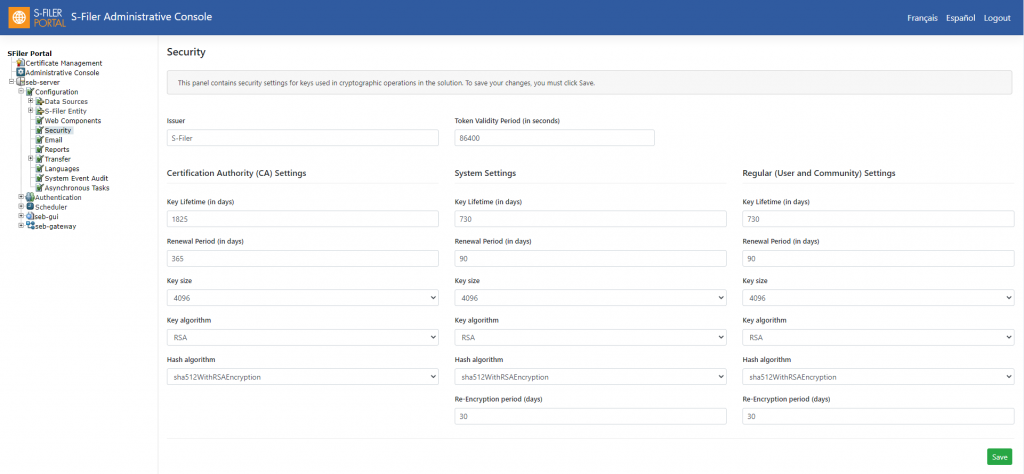
The main feature in this release is to allow all cryptographic material in the solution to be rotated. It is now possible to establish key renewal policies for all keys involved in file encryption. This completes the feature since rotation of other keys and certificates used for various protocols (SFTP, FTPS, HTTPS) was already possible in the solution.
Key renewal policies
It is now possible in the application to define renewal policies for all cryptographic artifacts. This includes the User and Community keys, but also the application System key and the internal Certificate Authority. This new key renewal process uses background tasks to avoid interfering with file transfers. The renewal policies are configured using a refactored Security Panel that allows you to control all aspects of the key renewal processes.
A new report has been created that describes all keys used in the application. This report is meant to simplify compliance audits by providing information such as key issuance and expiration.
Changes in the administrative console
The Administrative Console interface has been modernized; it now has a responsive interface so it can be used on devices of all screen sizes.
API and compatibility changes
- A small modification has been made to the http/anonymous Endpoint to allow the sender to overwrite the default value of “Quick Send Transfer Type”. The new optional parameter will impact the way the download process takes place. There are two values possible: HTTP and END-TO-END. When HTTP is specified, the download process will take places as soon the user clicks on the link. If the END-TO-END parameter is passed, an intermediate download page will be presented to the user before the download takes place. Note that when a password is requested, the intermediate page will be displayed, and the password will be asked no matter what value has been selected for the “Quick Send Transfer Type”.
- New Endpoints are now available to manage the User Status. It is now possible to lock, unlock and reset a password using the REST API. Please refer the API definition available of the S-Filer Server URL to have all the details: https://[server_url]/sfiler/server/api/docs/
- The default name of the S-Filer Gateway log file has been changed from sfiler-ga**teway.log to gateway.log in order to be consistent with the other solution log file name. It is always possible to keep the old file name by editing the log4j2.xml file and used your preferred file name.
- This version requires the latest version of the Microsoft JDBC drivers if you are using the MSSQL database. The old JTDS drivers are not supported anymore.
- The Hibernate dialect for MSSQL 2012 and later must be changed to org.hibernate.dialect.SQLServer2012Dialect in the sfiler.conf file.
Minor improvements and bugfixes
- A correction has been made in the Certificate Manager to allow for certificates that expire in or after 2038 when using a MySQL database (other databases did not have such a limitation).
- It is now possible to specify the Clickjacking and HTST HTTP response headers for each of the solution component individually. A new panel has been added in the Administrative Console in the Advance Settings for all the components. A restart of the component is required to make the setting changes effective.
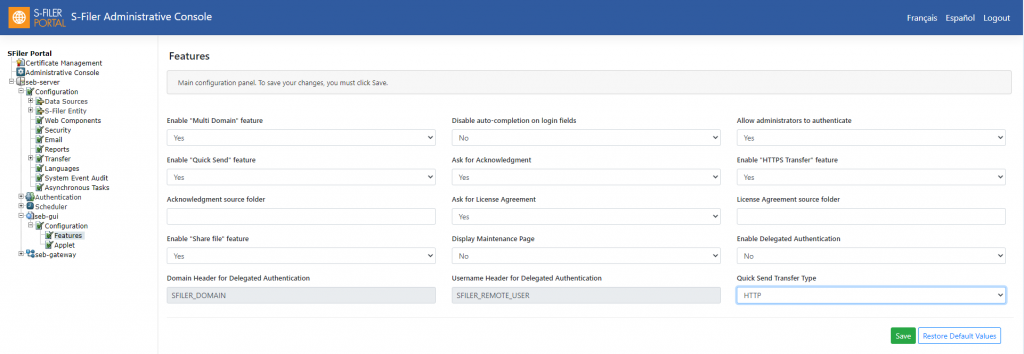
- A new configuration parameter named Quick Send Transfer Type has been added in the Administrative Console that controls how the Download takes place when using the link in Quick Send mail notifications. There are two options: HTTPS transfer (default and backwards compatible) or the new end-to-end transfer behavior. If the value is set to HTTP the download of the file will start immediately in HTTPS. When set to End-To-End, an intermediate page is displayed advising the user that the download will start shortly. That intermediate page is required to setup End-To-End encryption between the user browser and the S-Filer server.
Known issues
- For the moment there are no known issues.
Deprecations
- Reminder: Applet support will soon be removed. The Applet will be maintained within the solution at least as long as Microsoft officially supports the IE 11 browser which is the latest modern browser still supporting the Java plugin. It is recommended to migrate to the end-to-end encryption technology introduced in the solution and available with modern browsers.
Updating
This section describes an update from version 4.13.0
- This upgrade requires a manual intervention to be successful. A dedicated manual has been created that describes each step required to move to version 4.14.0.We strongly suggest that you perform a full backup of the solution before upgrading. Also note that the upgrade process might require an important downtime to properly introduced the key renewal data in the database. That is particularly true if your S-Filer instance contains many users, communities and files. Do not hesitate to reach our support group if you have any questions regarding this upgrade. support@okiok.com