
S-Filer Portal™ is a complete solution that allows large and small organizations to meet all their enterprise needs for secure file transfer and storage.
OKIOK RELEASES VERSION 4.20.0 OF S-Filer Portal™ SECURE TRANSFER SOLUTION
Breaking changes
This version introduces important changes that require special attention during the upgrade process. These changes only apply if you are using the On-Prem service. If you use the SaaS service, Okiok will implement the changes for your S-Filer Portal instance.
Change to email notification location
Notifications sent by the S-Filer Portal solution are historically located on the file system where the server resides. They are now moved to the database. To carry out this migration, a migration procedure involving the use of sfiler-config-cli is available here:
Upgrading to S-Filer Portal 4.20.0
Changes to notification e-mail format
In addition to transferring e-mails from the file system to the database, the notification format has been modified. Historically, the solution used a proprietary format for dynamic transformations. The new version now uses MVEL technology to perform the transformation. This library is widely used in the industry and offers great flexibility in the creation of notification templates. Consult the migration procedure to find out about the changes between the two approaches.
Using MVEL in the Mail Notification Template
Add new configuration parameter to server sfiler.conf file
A new configuration parameter named “cfg.server.batch.start” has been added to the server’s sfiler.conf file. The purpose of this configuration parameter is to determine whether the server should support scheduled tasks. The introduction of this new parameter is necessary to prevent the simultaneous execution of scheduled tasks in an environment comprising several servers. If the value is not set, it will be considered as “true” and automatically added to the sfiler.conf file after server startup. This means that scheduled tasks will be executed. In the case of a multi-server deployment of the S-Filer Portal solution, it is essential to have a single server responsible for executing scheduled tasks.
You can find details of the “export-server-config” command in the official documentation here:
Documentation : export-server-config command
Modification of the library loading sequence
The loading order of the various libraries has been modified to make it easier to overload a library. The loading order can be found in the wrapper.conf file. The /ext/lib directory will now be read first. This change only has an impact if you have deliberately modified the library loading order. However, we recommend that you apply the changes to the configuration in order to respect the new loading order. The files should now be loaded in the following order:
wrapper.java.classpath.1=ext/lib/*.jar wrapper.java.classpath.2=lib/*.jar wrapper.java.classpath.3=etc wrapper.java.classpath.4=conf
New features
MFA policy
Rules can be applied to configure multi-factor authentication (MFA) based on user groups. This feature gives you greater flexibility to enhance security based on the roles and responsibilities of each group within your organization.
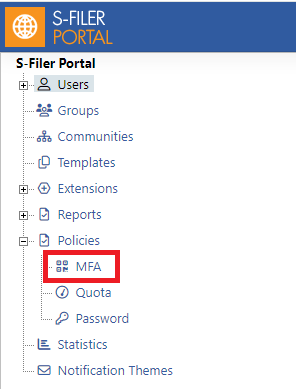
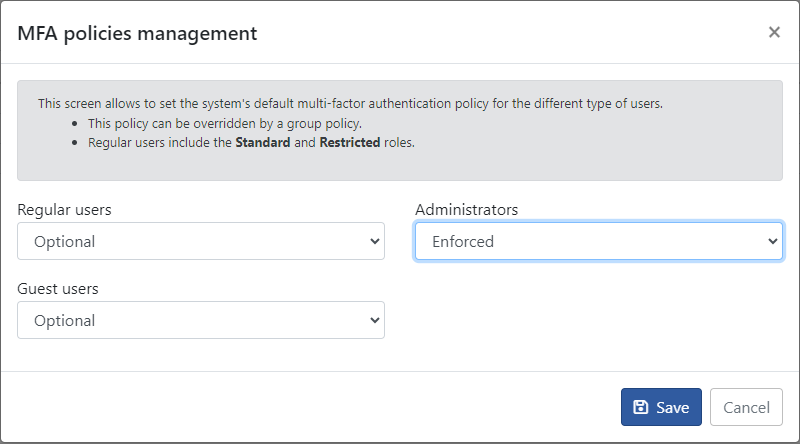
See the specific section on this feature in our documentation here:
Email notification template
It is now possible to manage the various notifications sent by e-mail directly from the application’s web interface. Previously, modifying notifications required access to S-Filer Portal’s server file system. As mentioned at the beginning of this article, you’ll need to migrate your notifications if you’re not using the application’s default notifications.
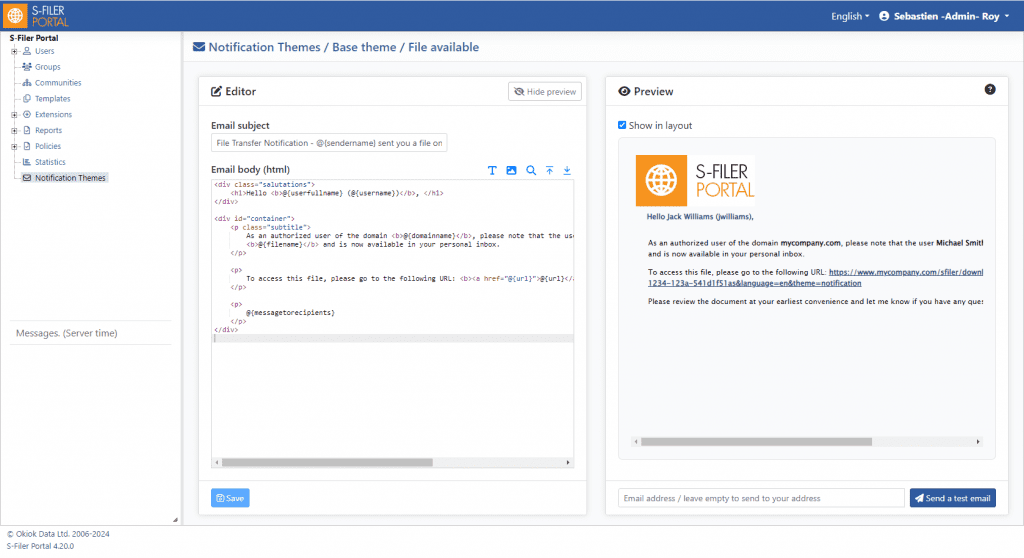
See the specific section on this feature in our documentation here:
Documentation : Administrating Notification Themes
Changes to user session management
User sessions are now stored in the database. Instead of using an in-memory structure, this feature enables sessions to be stored persistently, guaranteeing better management of user data and increased stability. This approach offers a number of advantages, including greater resilience in the event of a system reboot and greater scalability.
You can now find out how many users are using the application by consulting the UserSession table in the database.
Make sure you also configure the scheduler to clean up expired user sessions.
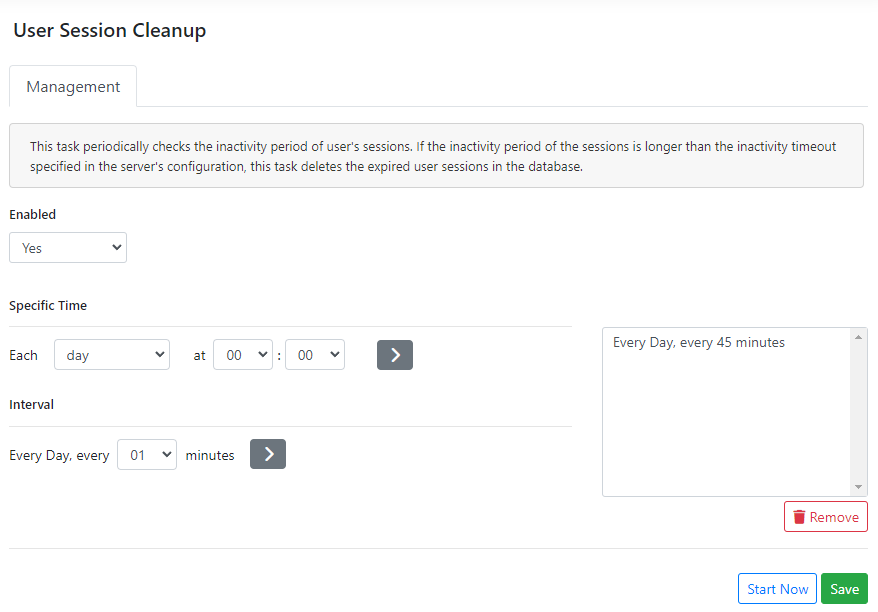
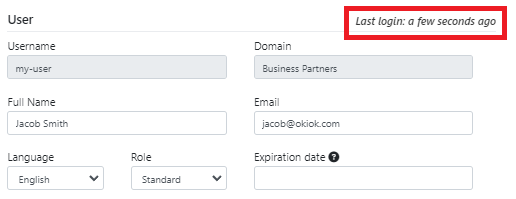
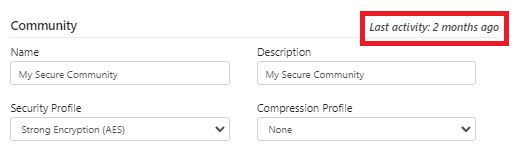
Visualization of the last period of activity of a user and a community
It is now possible to find out the last period of activity of a user or a community via the solution’s web interface. This makes it easy to identify whether a user or community is active, without the need for audit reports.
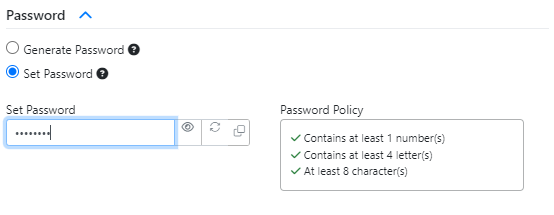
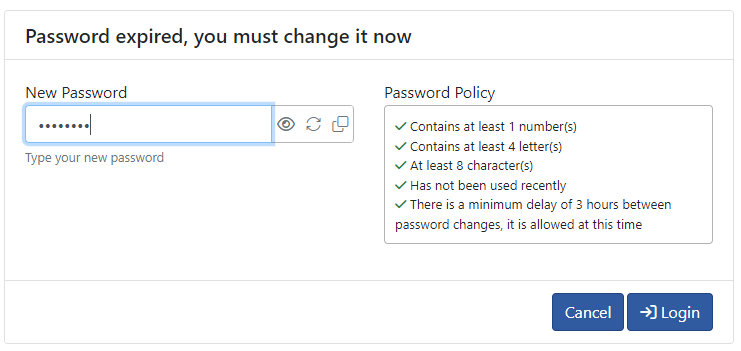
Addition of new functionalities for generating, copying and viewing passwords across different screens
We’ve enhanced our product with new features dedicated to password management. You can now easily generate, copy and view passwords directly from the interface. These tools enable you to create strong passwords with a single click, copy them for quick use and view them for easy verification.
Enable sfiler-config-cli to assume the type of an instance when modifying a configuration value
The sfiler-config-cli allows you to modify the application’s various configuration parameters using the “set-config” command. Previously, it was necessary to know the identifier of the configuration parameter to be modified. For example, to deploy the web interface through the gateway, the following command had to be used:
./sfiler-config-cli.sh -l mon-usager -p mon-mot-de-passe -cf “conf/sfiler.conf” set-config -t 3 -id 2 -k cfg.babelone.gateway.gui.interface.deploy -v true
Now you can do the same thing with the following command:
./sfiler-config-cli.sh -l mon-usager -p mon-mot-de-passe -cf “conf/sfiler.conf” set-config -n my-gateway -k cfg.babelone.gateway.gui.interface.deploy -v true
Adding JDBC Drivers natively during the installation process
JDBC drivers for MariaDB and MSSQL databases are now distributed with the solution. It is therefore no longer necessary to retrieve them from the urls of the various suppliers.
New “setup” command added to facilitate construction of sfiler-config-cli configuration file
The new sfiler-config-cli command setup is now available and allows you to configure the configuration file required by it. This command generates the configuration file without the need to know the details of the various configuration parameters.
./sfiler-config-cli.sh setup -i
User: my-user Password: my-strong-password DBMS (possible values: + [MYSQL, MARIADB, MSSQL, ORACLE]): MSSQL URL (optional, leave empty to setup host, port, and database manually): Host: 127.0.0.1 Port: 1433 Database: sfiler Driver (optional, default is com.microsoft.sqlserver.jdbc.SQLServerDriver): Hibernate Dialect (optional, default is org.hibernate.dialect.SQLServer2012Dialect): Output File (./cli.conf): Configuration file created. Ensure you provide a valid JDBC driver for your database in the lib folder. Download yours here: https://docs.microsoft.com/en-us/sql/connect/jdbc/download-microsoft-jdbc-driver-r-ver15 (S-Filer Portal ships with a valid Microsoft SQL Server JDBC Driver compatible with the latest version of the DBMS)
New parameter added to force deletion of an SSL certificate still in use
It is now possible to import and create a certificate with sfiler-config-cli, using an existing alias to replace the certificate in use. This new option (-damm) lets you determine the behavior of the command. This avoids having to delete the certificate before using a new version of it. This new option is available for the following commands:
- 1. generate-key-pair
- 2. generate-ssh-key
- 3. import-certificate-file
As an example, here’s a command that imports a certificate using the new -damm parameter:
./sfiler-config-cli.sh -l my-user -p my-strong-password -cf “conf/sfiler.conf” import-certificate-file -a “my-alias” -f fichier-certificat.cer -damm replace
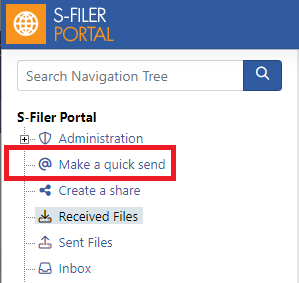
Removed quick send buttons from the horizontal bar so that they only exist in the left-hand menu
Historically, it was possible to access the quick send functionality directly from the horizontal bar using the “@Send” button. This option has been removed, leaving only the link in the left-hand menu. The aim of this removal is to eliminate the potential hypothesis of a link between the community and the quick send that could be triggered from the button.
File versions taken into account when calculating storage space
When a community is configured to support file versioning, only the current file version was taken into account when calculating disk space. The file report and statistics screen have been adapted to illustrate actual disk space usage.
Bug fixes
- Correction to the e-mail sent when a user is duplicated, so as not to send a password that cannot be used by a user. Instead, users are invited to contact the administrator to obtain the password assigned to them.
- The management console certificate update did not reproduce the changes made to the sfiler.conf configuration file.
- Correction to the notification process notifying the expiry of a share when the default expiry value overload parameter was used.
- Correction of the “-upgrade-checksums” option in the update-db-schema command, which caused the new checksums of some ChangeSets to no longer work.
Known issues
There are currently no known problems with this version.
* This upgrade does not requires an update of the database. We strongly recommend that you perform a full backup of the solution prior to the upgrade. Do not hesitate to contact our support group if you have any questions regarding this upgrade at support@okiok.com