
Upgrading to S-Filer Portal 4.21.0
This document describes the steps required to upgrade from S-Filer Portal 4.20.x to S-Filer Portal 4.21.0.
Version 4.21.0 is a major release: it changes the required Java version, introduces a new base notification theme, adds seven new notifications, replaces the user notification preference mechanism, introduces direct accesses and file requests, and adds around forty new configuration parameters. Read this document in full before planning the upgrade.
Important
Three items in this release require explicit administrator action and cannot be left at their default values without consequence:
- The new notifications must be reviewed so that they match your organization's corporate identity — see New notifications to validate.
- The consolidated email must be customized before smart notifications are enabled — see Smart Notifications.
- The new configuration parameters must be given the values that match your environment — see New configuration parameters.
Before you start
Technical prerequisites
Important
S-Filer Portal 4.21.x requires Java 25. Version 4.20.x ran on Java 17.
In most cases you have nothing to install: the Windows and Linux installers ship the Java runtime, and the components installed that way use it directly. The Java runtime must however be provided by the system, and therefore upgraded to Java 25, in the following cases:
- installation on Linux through the APT packages, which rely on the system Java runtime;
- container images or deployments you build yourself;
- workstations that run the command line utilities (
sfiler-cli,sfiler-config-cli,sfiler-cli-admin) from the distribution archive.
Windows Server 2025
On Windows Server 2025, run the installer in compatibility mode for Windows Server 2016: in the Properties of the installer executable, open the Compatibility tab, check Run this program in compatibility mode for and select Windows Server 2016.
See Also
Before doing anything else:
- Take a full backup of the database and of the configuration directories (
conf/,etc/). - Confirm that the Java 25 runtime is available on every node whose runtime is not provided by the installer.
- Take note of the security profiles that are currently enabled.
- If you deploy custom extensions, check whether they call
createDocumentFromOriginalContext: they must be recompiled against 4.21.0, see Custom extensions. - If you have Java integrations built on the S-Filer Portal Java API, check whether they use the
TransferThreadPoolclass, which is removed, see Java API.
Process overview
The upgrade always follows the same order. Each step is detailed in the sections below.
- Update the database schema using the
update-db-schemacommand of thesfiler-config-cli. - Deploy the new version on every node.
- Assign values to the new configuration parameters.
- Review and customize the notifications (base theme 4.21, new notifications, consolidated email).
- Activate the Version 4.21 version flag once every node has been upgraded, the parameters configured and the notifications reviewed.
- Enable or disable the optional features (the Email Consolidation, Disable Legacy Guest Permissions, Quick Send and Request Files feature flags).
- Enable the multi-factor authentication methods you want to offer (email, SMS) — see Multi-factor authentication.
- Communicate the changes to your users.
Warning
Steps 3 and 4 deliberately come before the version flag is enabled:
- the new configuration parameters appear in the Administrative Console as soon as the database schema is updated, without waiting for the version flag to be enabled;
- the notification template editing screen also remains usable before the version flag is enabled, precisely so that you can customize the new templates — see Preparing the notifications before enabling the version flag.
Warning
The database schema update creates an index on the CreationDate column of the AuditTransfer and AuditFileInfo tables, and an index on the UnderCommunityUUID, CreationDate and Action columns of the AuditTransfer table, which reduce the activity report generation time. Depending on the size of these tables, creating the indexes can make the update take a long time. Plan for this time in your maintenance window.
An index that already exists under the name SYS_IDX_AUDITTRANSFER_CREATIONDATE, SYS_IDX_AUDITFILEINFO_CREATIONDATE or SYS_IDX_AUDITTRANSFER_COMM_DATE_ACTION is not created again.
On MySQL and MariaDB, the update also rebuilds the SystemEventAudit table once: its Id column becomes AUTO_INCREMENT, and its SignedValue and Description columns become nullable. During the rebuild, the table can still be read but no audit can be written, for a time proportional to the size of the table. To avoid this interruption, you can apply the same change online beforehand, for example with pt-online-schema-change: the update detects that the change was already made and skips it.
See Also
Feature management
To provide better feature management, S-Filer Portal uses a feature management system. This system makes it possible to enable the features introduced by the current version. You can therefore deploy the current version while keeping the behaviour of the previous version, which simplifies the upgrade process and guarantees better system stability.
Flags present in version 4.21.0
The database schema update creates the following flags. Note the difference in initial value between an existing installation (upgraded from 4.20.x) and a new installation: on an existing installation, the flags are disabled so that the platform keeps behaving as it did in 4.20. The exceptions are the Quick Send and Request Files feature flags. No feature flag has any effect until the Version 4.21 version flag is enabled, whatever its own value.
| Flag | Type | Existing installation | New installation | Effect when enabled |
|---|---|---|---|---|
Version 4.21 (version.flag.4-21-x) | Version flag | Disabled | Enabled | Enables all the new 4.21 behaviours (new quick send screens, file requests, direct accesses, email and SMS multi-factor authentication, per-recipient send statuses, REST API v3, and so on). |
Email Consolidation (feature.flag.mail.consolidation) | Feature flag | Disabled | Enabled | Enables smart notifications and the consolidated email. Must be enabled separately, after the consolidated email has been customized. |
Disable Legacy Guest Permissions (feature.flag.disable.legacy.guest.permissions) | Feature flag | Disabled | Enabled | Removes the legacy rights of guest users on files sent by others and on the administration of communities and Shares. |
Quick Send (feature.flag.quick.send) | Feature flag | Value of the cfg.server.transfer.service.rest.anonymous.download switch: enabled, unless that switch was set to false | Enabled | Makes quick sends available, in the web interface, the REST API and the command line, to the users whose groups grant the Quick Send permission. Disabled, quick sends are available to no user. Applies only once the Version 4.21 version flag is enabled. |
Request Files (feature.flag.request.files) | Feature flag | Enabled | Enabled | Makes file requests available, in the web interface and the REST API, to the users whose groups grant the Request Files permission. Disabled, file requests are available to no user. Applies only once the Version 4.21 version flag is enabled. |
Warning
Once the Version 4.21 version flag is enabled, the two switches that used to turn quick sends off are ignored: the Enable "Quick Send" feature setting of the web interface (cfg.java.gui.sfiler.feature.anonymous.download) and its REST API counterpart (cfg.server.transfer.service.rest.anonymous.download). Only the REST API switch is carried over, into the initial value of the Quick Send feature flag. An instance that had turned quick sends off in the web interface only must therefore disable the Quick Send feature flag, or review the Quick Send permission of its groups, before enabling the version flag.
These two switches are removed by the database update of version 4.22.0.
Warning
The Version 4.21 version flag and the Email Consolidation feature flag are two distinct flags. Enabling the version flag does not enable mail consolidation.
This separation is deliberate: unlike the version flag, which accompanies the upgrade and is meant to be enabled once and for all, the Email Consolidation feature flag governs a feature that your organization enables when it decides to, much like the extensions you enable or disable in the Administrative Console. The consolidated email changes the way your users receive their notifications: putting it into service is an operational decision, independent from the upgrade schedule.
Important
Since the Email Consolidation feature flag determines whether your users receive consolidated emails, do not enable and disable it to prepare an upgrade: every change of value immediately affects all the emails sent afterwards. Customizing the templates does not require disabling it either: see Preparing the notifications before enabling the version flag.
Enabling and disabling
Enabling and disabling are done with the update-feature-flag command of the sfiler-config-cli. To list the available flags and their state, use the list-feature-flags command.
./sfiler-config-cli.sh -l my-user -p my-password -cf "conf/sfiler.conf" list-feature-flagsYou can then enable a flag with the -n option (flag name) and the -s option (true or false). The CLI uses the technical name of the flag: the Version 4.21 version flag is named version.flag.4-21-x.
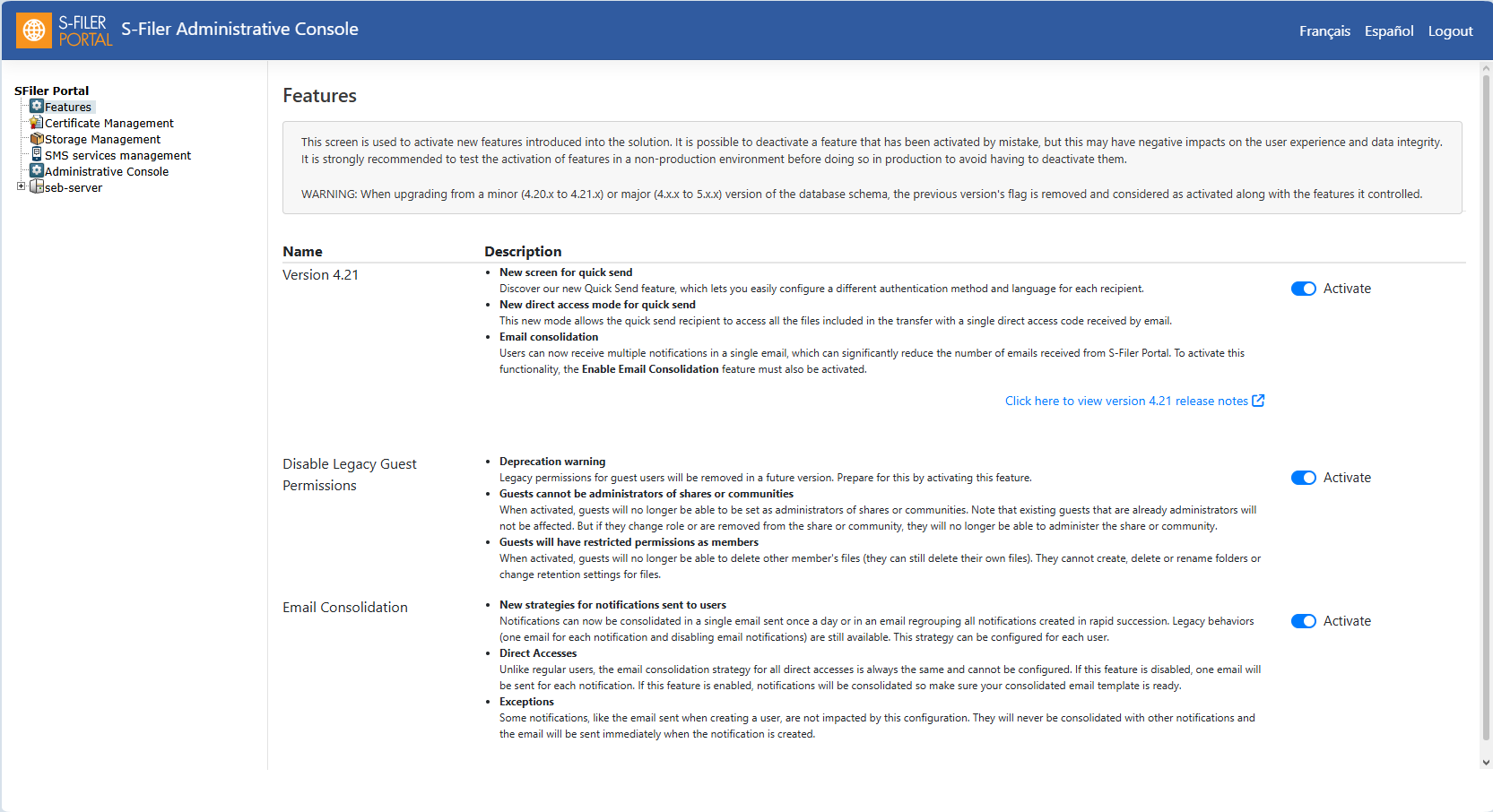
./sfiler-config-cli.sh -l my-user -p my-password -cf "conf/sfiler.conf" update-feature-flag -n "version.flag.4-21-x" -s "true".\sfiler-config-cli.bat -l my-user -p my-password -cf "conf\sfiler.conf" update-feature-flag -n "version.flag.4-21-x" -s "true"The same operation can also be performed directly from the S-Filer Portal Administrative Console:
Warning
Enabling a flag is only applied at an exact multiple of 5 minutes (for example 10:05, 10:10, 10:15). This delay guarantees that every node switches to the new behaviour at the same time. Plan for this delay in your maintenance window.
Important
What follows applies only to the Version 4.21 version flag, which is not meant to be disabled once it has been enabled. Rolling it back is technically possible, but the procedure may lead to inconsistencies in the system: once the version flag is active, the platform may have written data to the database whose format depends on the new behaviour. Only perform this operation when necessary, and first contact the OKIOK support team to fully understand the impact.
The feature flags, on the other hand, govern features that your organization enables and disables as it sees fit. Do keep in mind the immediate effect of the Email Consolidation feature flag on the emails sent to your users.
Choosing an upgrade scenario
Scenario 1: upgrade with a service outage
This is the simplest scenario and suits single-node deployments or cases where a maintenance window is available.
- Stop the S-Filer Portal services.
- Upgrade the application on every node.
- Run the database update command (
update-db-schema). - Start the S-Filer Portal services.
- Assign values to the new configuration parameters.
- Prepare the notification theme you will use in 4.21 (see Base theme management) and review the templates it contains.
- Review the new notifications and customize the consolidated email using the web notification configuration interface.
- Enable the Version 4.21 version flag.
- Review the Consolidable flag of your templates, which only becomes editable once the version flag is active (see The "Consolidable" flag).
- Enable the Email Consolidation feature flag.
- Inform your users that they can now customize their notification preferences.
Scenario 2: upgrade without a service outage
This scenario applies to high availability deployments. It is more complex: during the deployment, some nodes still run version 4.20.x while others run version 4.21.0. The version flag guarantees that every node behaves like version 4.20 as long as it is not enabled.
Important
The nodes that still run the previous version must be on the latest available 4.20 version. This is what makes the rolling upgrade work correctly: an earlier 4.20 version does not necessarily carry all the compatibility fixes that let both versions coexist.
- Run the database update command (
update-db-schema). - Deploy the new version of the application, node by node.
- Assign values to the new configuration parameters.
- Prepare the notification theme you will use in 4.21 and customize its templates, including the consolidated email, in the web interface.
- Wait until the deployment of version 4.21.0 is complete on every node.
- Enable the Version 4.21 version flag.
- Review the Consolidable flag of your templates, which only becomes editable once the version flag is active (see The "Consolidable" flag).
- Enable the Email Consolidation feature flag.
- Invite your users to customize their notification preferences.
Preparing the notifications before enabling the version flag
As long as the Version 4.21 version flag is not enabled, the platform behaves as it did in 4.20. Two exceptions were deliberately introduced, however, so that you can prepare version 4.21 before putting it into service:
- The new configuration parameters are created by the database schema update and appear immediately in the Administrative Console and in the
sfiler-config-cli. You can therefore assign your values to them before enabling the flag. - The notification template editing screen remains fully functional. You can create a theme, review and modify the content of every template — including the new ones, such as the consolidated email — and send a test email, without the version flag being active.
Warning
Only one characteristic of the templates cannot be modified while the version flag is inactive: the Consolidable checkbox does not appear in the template editing screen. Plan to review that flag after enabling the version flag and before enabling the Email Consolidation feature flag — see The "Consolidable" flag.
It is therefore no longer necessary to use the export and import commands of the sfiler-config-cli to prepare your themes. Those commands remain useful to move a theme from one environment to another, for example from a test environment to production.
See Also
- import-notification-themes command
- export-notification-theme command
- preview-notification-theme command, new in 4.21.0: renders the templates of an exported theme to HTML and
.emlfiles, without a database or server, and warns about the variables that no notification provides, which render empty - How to edit a notification theme with a coding agent
Base theme management
Version 4.21.0 introduces a new base notification theme named Base theme 4.21. The base theme of version 4.20, named Base theme, is kept but loses its base theme status.
Here is what the database schema update performs automatically:
| Item | Behaviour after the upgrade |
|---|---|
| Base theme 4.21 (new base theme) | Created as read-only. On an existing installation it is created inactive and not set as default, so the appearance of the emails you send does not change. |
| Base theme (former 4.20 base theme) | Kept, but no longer the base theme. It becomes an ordinary theme and is therefore editable and deletable. |
| Existing custom themes | The templates of the new notifications are automatically copied from Base theme 4.21 into every existing theme, for every language. Templates you have already customized are not modified. |
Important
The templates copied into your custom themes come from the OKIOK base theme. Their layout remains yours: the Layout template of your theme frames every content, including the ones that were just copied. Their content, on the other hand — wording, tone, message structure, buttons — is OKIOK's, not yours. You must therefore review each of the new notifications in each of your custom themes and in each language your instance uses.
Warning
The base theme is read-only; it cannot be modified. To adapt the notifications to your corporate identity, create a copy of an existing theme and adjust that copy.
Choosing the source theme
Once the schema update has run, every theme present in the database contains all the version 4.21 templates. Selecting Base theme 4.21 as the Source theme is therefore not required to obtain a complete theme. Both approaches are valid and the choice depends on what you want to favour:
| Source theme selected | What you get | What is left to do |
|---|---|---|
| Base theme 4.21 | The most up-to-date version of the OKIOK templates, including those revised in 4.21 (for example FILE_DELETED, adapted to the fact that a folder can now be deleted, and not only a file). | Reapply your customization to every template, since the copy starts from the OKIOK corporate identity. |
| One of your existing themes | All of your current customization. | Adapt the content of the templates whose reference version changed in 4.21, and customize the templates added by the version. |
In both cases, the templates added by the version being installed must be customized: they come from the OKIOK base theme — see New notifications to validate.
Revised wording and solution name
Base theme 4.21 rewords all the notifications of the base theme. Installations that keep the former Base theme as their default theme or in groups keep the former wording of its existing notifications; the new wording applies to the themes that use Base theme 4.21 or are cloned from it. The templates of the new notifications, copied into every theme from Base theme 4.21, use the new wording in all themes, including the former Base theme.
- The notifications of Base theme 4.21 name the solution with the Solution Name parameter, in their subjects and bodies. By default, its value is S-Filer Portal, and the base theme no longer mentions OKIOK as the provider of the solution.
- An installation that is presented to its users under another name must configure this parameter (Administrative Console > server configuration > Email > Solution Name, or
set-configwithcfg.server.mail.notification.service.solution.name). Otherwise, the notifications display S-Filer Portal. The SMS verification code uses the Issuer name parameter of the SMS service instead (cfg.server.sms.service.sms.issuer). - The footer of the notifications gives a help address only once the Support Email Address parameter (
cfg.server.mail.notification.service.support.email) is configured. The notifications no longer tell recipients to contact the administrator for help: without this address, they give no contact. - The templates already present in custom notification themes are not modified by the upgrade, and no variable was removed or renamed. They can adopt the new variables and tools described in Notification template variables and Consolidated email.
- Templates that split
@{recipient}must take into account the space now added before the parenthesis (Jane Doe (jdoe) instead of Jane Doe(jdoe)). - Templates that use
lastActivityDate(in UTC) keep working, but should switch toformattedLastActivityDate.
- Templates that split
- A variable that a notification does not provide is now rendered as empty text, instead of leaving the raw
@{variable}tag in the email.- A custom theme that tested a missing variable by comparing it to its own tag (
@if{messagetorecipients != '@{messagetorecipients}'}) now displays the block, empty. Replace the test with@if{messagetorecipients != empty}. See Template syntax. - A custom theme that displayed
@{messagetorecipients}without a test no longer shows the raw tag, but empty text.
- A custom theme that tested a missing variable by comparing it to its own tag (
New notifications to validate
Seven new notifications are introduced in version 4.21.0. Each of them must be reviewed so that it matches your organization's corporate identity, in every theme and in every language your instance uses.
| Notification | Mode | Consolidable | Description | Review priority |
|---|---|---|---|---|
Consolidated email (CONSOLIDATED_EMAIL) | No | Groups several notifications into a single email. This is the richest template in the solution. | Critical — sent as soon as the Email Consolidation feature flag is active. | |
Direct access available (DIRECT_ACCESS_AVAILABLE) | No | Sends a recipient the direct access code that lets them retrieve files without a share link. | Critical — carries an access secret; the wording and tone must be unambiguous. | |
SMS access code (SMS_ACCESS_CODE) | SMS | No | Sends the one-time code used as an authentication factor by SMS. | Critical — see the note below about the SMS format. |
Email access code (EMAIL_ACCESS_CODE) | No | Sends the one-time code used as an authentication factor by email. | High | |
User adopted (USER_ADOPTED) | No | Welcomes a user created automatically by an adoption rule (automatic registration). | Medium — only sent if the adoption rule enables the notification. | |
Account will be inactive (ACCOUNT_WILL_BE_INACTIVE) | Yes | Warns a user that their account is about to become inactive due to lack of use. | Medium — only sent if the notification delay is configured. | |
Account will be deleted (ACCOUNT_WILL_BE_DELETED) | Yes | Warns a user that their account is about to be deleted. | Medium — only sent if the notification delay is configured. |
Important
The SMS access code notification is a text message, not an email. HTML tags, images and the layout template do not apply. Keep the message very short: the length of the text has a direct impact on the cost billed by your SMS provider and on the readability of the message. Like the other notifications, this template has a distinct content per language; only the Subject field does not apply to the SMS mode.
Variables available for the new notifications
| Notification | Variables |
|---|---|
CONSOLIDATED_EMAIL | username, userfullname, domainname, theme, login_url, notificationType, imagesurl, plus all the consolidated email list variables |
DIRECT_ACCESS_AVAILABLE | directAccessCode, community, sendername, sendershortname, senderfullname, sendermailaddress, theme, messagetorecipients, login_url, notificationType, recipientAuthType, imagesurl |
SMS_ACCESS_CODE | smsIssuer, accessCode, accessCodeValidityMinutes, notificationType |
EMAIL_ACCESS_CODE | accessCode, accessCodeValidityMinutes, username, userfullname, notificationType, imagesurl |
USER_ADOPTED | username, userfullname, domainname, theme, url, login_url, notificationType, imagesurl |
ACCOUNT_WILL_BE_INACTIVEACCOUNT_WILL_BE_DELETED | username, userfullname, domainname, expire, expirationInstant, formattedExpirationDate, lastActivityInstant, formattedLastActivityDate, adoptionInstant, formattedAdoptionDate, accountEndInstant, formattedAccountEndDate, theme, url, login_url, notificationType, imagesurl, cleanupReason |
Every email template, new or existing, also receives solutionName, supportEmail, dateFormatter and lists (see Notification template variables).
Warning
Variable names are case sensitive. Use exactly the case shown in the tables (for example accessCodeValidityMinutes, login_url): a misspelled variable renders as an empty value in the email.
New variables added to existing notifications
Existing notifications receive new variables. They are optional: your current templates keep working without any change. You may, however, use them to enrich your notifications. These variables are only populated once the Version 4.21 version flag is enabled; before that, they render as empty values. The exceptions are provided whether the version flag is enabled or not: fileRecipientType, fileRecipientName, recipientfullname, recipientAccountType, recipientAuthType, instanceName, directAccessCode, storageOrphanFiles, databaseOrphanFiles, and the last activity date of COMMUNITY_WILL_BE_DELETED (lastActivityInstant, formattedLastActivityDate).
The table is laid out by notification: when you edit a template, you find right there the variables that have just been added to it. The solutionName, supportEmail, dateFormatter and lists variables, added to every email template, are not repeated in it.
| Notification | Variables added |
|---|---|
COMMUNITY_DELETED | numberOfFiles, lastActivityInstant, formattedLastActivityDate, deletedBy, genericReason, deletionInstant, formattedDeletionDate, recipientAccountType |
COMMUNITY_WILL_BE_DELETED | numberOfFiles, expirationInstant, formattedExpirationDate, lastActivityInstant, formattedLastActivityDate, recipientAccountType |
FILE_AVAILABLE_NODE | filePath, fileAbsolutePath, fileFullPath, fileSize, uploadInstant, formattedUploadDate, recipientAccountType |
FILE_AVAILABLE_COMMUNITY | filePath, fileAbsolutePath, fileFullPath, fileSize, uploadInstant, formattedUploadDate, recipientAccountType |
FILE_AVAILABLE_ANONYMOUS | recipientAccountType, recipientAuthType |
FILE_DELETED | numberOfFiles, filePath, fileAbsolutePath, fileFullPath, fileType, fileRecipientType, fileRecipientName, deletedBy, genericReason, deletionInstant, formattedDeletionDate, recipientAccountType |
FILE_WILL_BE_DELETED | filePath, fileAbsolutePath, fileFullPath, expirationInstant, formattedExpirationDate, lastActivityInstant, formattedLastActivityDate, fileRecipientType, fileRecipientName, recipientAccountType |
RECEPTION_ACKNOWLEDGE | downloadInstant, formattedDownloadDate, fileAbsolutePath, fileFullPath, fileRecipientType, fileRecipientName, recipientfullname, recipientAccountType |
ANONYMOUS_INVALID_ADDRESSPASSWORD_EXPIRES_SOON | recipientAccountType |
FRAMEWORK | username, recipientAccountType, recipientAuthType, directAccessCode, instanceName |
ORPHAN_FILES_DELETED | storageOrphanFiles, databaseOrphanFiles, recipientAccountType, instanceName |
SYSTEM_AUDIT_INTEGRITY_CHECKCERTIFICATE_EXPIREDCERTIFICATE_EXPIRES_SOON | recipientAccountType, instanceName |
deletedBy gives the full name of the person who deleted the file or the community; it is empty when the deletion was automatic. genericReason is true when the reason only says that this person deleted it, so that a template that displays deletedBy can leave the reason out. deletionInstant and formattedDeletionDate give the date of the deletion. instanceName gives the name of the server instance that raised an alert.
fileFullPath is the path of the file followed by its name, for example /Project Phoenix/Reports/report.pdf. fileRecipientType tells where the file had been sent: community, inbox (the inbox of the recipient of the email), user (the inbox of another user) or anonymous (an email address). fileRecipientName gives the name of that community, user or address.
The lists tool groups, sorts and shortens lists of items, such as the files of a consolidated email.
See Also
The "Consolidable" flag
A consolidable notification can be included in a consolidated email instead of being sent individually. The template editing screen offers a Consolidable checkbox that determines, template by template, whether the notification is actually consolidated.
OKIOK determines which notification types are eligible for consolidation. Only the following types offer the Consolidable checkbox:
COMMUNITY_DELETED, COMMUNITY_WILL_BE_DELETED, FILE_AVAILABLE_NODE, FILE_AVAILABLE_COMMUNITY, FILE_DELETED, FILE_WILL_BE_DELETED, ACCOUNT_WILL_BE_INACTIVE, ACCOUNT_WILL_BE_DELETED, RECEPTION_ACKNOWLEDGE and USER_SHARE.
For every other type — USER_CREATED, for instance — the checkbox is not displayed: those notifications are always sent individually. You can therefore remove from consolidation a type we included in it, but you cannot add a type we excluded from it.
Warning
The Consolidable checkbox only appears once the Version 4.21 version flag is enabled. This review is therefore planned after enabling the version flag and before enabling the Email Consolidation feature flag.
Important
During the upgrade, the initial state of that flag depends on where the template comes from:
- a template of a consolidable type that already existed in 4.20 is migrated with Consolidable enabled;
- a template copied into your theme by the upgrade, because its type is new in 4.21, is created with Consolidable disabled.
A single theme can therefore hold both states. Review the flag on each of your templates before enabling the Email Consolidation feature flag, and before checking the box for a notification, make sure that it is properly handled by your consolidated email template. Otherwise, the notification could never reach the user.
Validating the notifications
The web interface lets you validate the result before putting it into service:
- Use the Show/Hide preview button to see how the template renders.
- Check Show in layout to see the template embedded in the Layout template.
- Use the Send a test email button to receive the notification in a real mailbox and validate the rendering in the mail clients used by your organization.
Warning
Email rendering differs noticeably between Microsoft Outlook and other clients, in particular in the way images are handled. Test each new notification in the mail clients your recipients actually use before putting the new templates into service.
Smart Notifications
This version introduces the concept of smart notifications, which send notifications according to each user's preferences rather than one notification per event.
Consolidation strategies
The user's boolean "mail notification" field is replaced by a consolidation strategy offering four values:
| Strategy | Behaviour |
|---|---|
IMMEDIATE | Each notification is sent separately and immediately. This is the version 4.20 behaviour. |
SMART | Notifications sent in rapid succession are grouped into a consolidated email. |
DAILY | A daily summary of notifications is sent. |
NONE | Notifications are disabled for this user. |
Upgrade impact on existing users
Warning
No action is required to preserve your users' current behaviour.
The consolidation strategy column is added with no value for existing users. When it is empty, the solution derives the strategy from the former mail notification indicator:
- a user who was receiving email notifications → treated as
IMMEDIATE; - a user who was not receiving email notifications → treated as
NONE.
Following the upgrade, users therefore keep exactly the same notification mode. The derived strategy is then written to the database the first time the user is created or updated, whatever the reason — the notification preference does not need to be changed explicitly.
In addition, as long as the Email Consolidation feature flag is not active, a SMART or DAILY strategy is treated as IMMEDIATE. There is therefore no risk of a user stopping to receive notifications because consolidation is not enabled yet. Note however that a stored SMART or DAILY strategy is rewritten to IMMEDIATE the next time the user is updated while the flag is inactive: the original preference is not restored if the flag is enabled later.
Per-user notification preferences
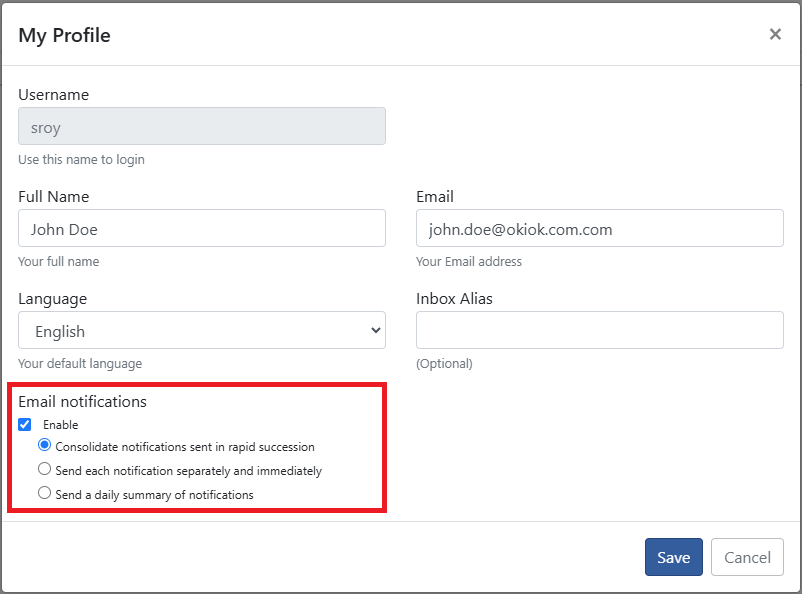
Each user can change their notification preferences from their profile configuration screen:
Warning
As soon as the Email Consolidation feature flag is enabled, your users can select the SMART and DAILY strategies, and therefore receive the new consolidated email. It is essential to have finished customizing that template before enabling this flag.
Adoption rules (automatic registration)
Adoption rules receive a new parameter that determines the strategy assigned to automatically created accounts.
| Parameter | Default value | Possible values |
|---|---|---|
cfg.authentication.external.adoption-rule.mailConsolidationStrategy | SMART | SMART, IMMEDIATE, DAILY, NONE |
Warning
Although the parameter default is SMART, the schema update rewrites the value of your existing adoption rules in order to preserve their current behaviour:
- a rule that enabled mail notification →
IMMEDIATE; - a rule that did not →
NONE.
If you want new accounts to benefit from smart notifications, you must explicitly change this parameter on each of your adoption rules.
Consolidated email configuration parameters
| Parameter | Default value | Description |
|---|---|---|
cfg.server.mail.notification.service.consolidation.daily.sending.time | 8 | Hour of the day (0 to 23) at which the DAILY strategy summary is sent. Adjust it to your organization's time zone and business hours. |
cfg.server.mail.notification.service.consolidation.smart.delay.maximum.without.new.notification.minutes | 5 | SMART strategy: idle delay, in minutes, after which accumulated notifications are sent. The minimum value enforced is 1. |
cfg.server.mail.notification.service.consolidation.smart.delay.maximum.absolute.minutes | 60 | SMART strategy: absolute maximum delay, in minutes, before accumulated notifications are sent, even if new notifications keep arriving. The minimum value enforced is 15. |
Example
With the default values, a user on the SMART strategy who receives three files within five minutes receives a single consolidated email, sent five minutes after the last accumulated notification. If files keep arriving without interruption, the email is still sent after 60 minutes.
New configuration parameters
All the parameters below are created with a default value during the database schema update. The default values are chosen to preserve the version 4.20 behaviour. Review each table and assign the values that match your environment.
Quick sends and direct access
| Parameter | Default value (existing installation) | Description |
|---|---|---|
cfg.server.transfer.service.anonymous.download.default.mode | DOWNLOAD_LINK | Mode used by default for quick sends. DOWNLOAD_LINK reproduces the version 4.20 behaviour (share link). DIRECT_ACCESS_TOKEN enables direct accesses. New installations use DIRECT_ACCESS_TOKEN. |
cfg.server.transfer.service.anonymous.download.default.sharename.en | Files sent by ${SENDER} to ${RECIPIENT} on ${TIMESTAMP} | Default generated name for the share created in DIRECT_ACCESS_TOKEN mode, in English. |
cfg.server.transfer.service.anonymous.download.default.sharename.fr | Fichiers envoyés par ${SENDER} à ${RECIPIENT} le ${TIMESTAMP} | French equivalent. |
cfg.server.transfer.service.anonymous.download.default.sharename.es | Archivos enviados por ${SENDER} a ${RECIPIENT} el ${TIMESTAMP} | Spanish equivalent. |
cfg.server.transfer.service.anonymous.download.default.sharename.it | File inviati da ${SENDER} a ${RECIPIENT} in data ${TIMESTAMP} | Italian equivalent. |
cfg.server.transfer.service.anonymous.download.default.sharename.de | Dateien gesendet von ${SENDER} an ${RECIPIENT} am ${TIMESTAMP} | German equivalent. |
Warning
Automatically generated share names are visible to recipients. The ${SENDER}, ${RECIPIENT} and ${TIMESTAMP} variables respectively expose the sender, the recipient and the timestamp. If your organization does not want the recipient address disclosed in the share name, adjust these five parameters before enabling DIRECT_ACCESS_TOKEN mode.
Automatically generated share names can be long, depending on the template used and on the variable-length information they may contain (sender, recipient and timestamp). To allow longer names, the database columns holding the name and the description of communities and groups were enlarged from 128 to 256 characters. However, the following settings of the Administrative Console can still limit the length of the names S-Filer accepts.
| Parameter | Name | Old default value | New default value |
|---|---|---|---|
cfg.server.management.service.community.communityid.max.length | Community ID Max Length | 128 | 256 |
cfg.server.management.service.community.description.max.length | Description Max Length | 128 | 256 |
cfg.server.management.service.usergroup.groupid.max.length | Group ID Max Length | 128 | 256 |
cfg.server.management.service.usergroup.description.max.length | User Group description Max Length | 128 | 256 |
A new installation uses the new default value of these settings, 256, which matches the new size of the columns. On an existing installation, the database migration sets these settings to 256 only when their current value is still the old default of 128; any other value is left unchanged.
Before enabling DIRECT_ACCESS_TOKEN mode, check these settings in the Administrative Console to make sure the generated names can be long enough.
File requests
| Parameter | Default value | Description |
|---|---|---|
cfg.server.transfer.service.anonymous.upload.default.sharename.en | Files requested from ${RECIPIENT} by ${SENDER} on ${TIMESTAMP} | Default generated name for the share created by a file request, in English. |
cfg.server.transfer.service.anonymous.upload.default.sharename.fr | Fichiers demandés à ${RECIPIENT} par ${SENDER} le ${TIMESTAMP} | French equivalent. |
cfg.server.transfer.service.anonymous.upload.default.sharename.es | Archivos solicitados a ${RECIPIENT} por ${SENDER} el ${TIMESTAMP} | Spanish equivalent. |
cfg.server.transfer.service.anonymous.upload.default.sharename.it | File richiesti a ${RECIPIENT} da ${SENDER} in data ${TIMESTAMP} | Italian equivalent. |
cfg.server.transfer.service.anonymous.upload.default.sharename.de | Dateien angefordert von ${RECIPIENT} durch ${SENDER} am ${TIMESTAMP} | German equivalent. |
Warning
The previous warning about the share names generated for quick sends in DIRECT_ACCESS_TOKEN mode also applies to file requests.
The ${SENDER}, ${RECIPIENT} and ${TIMESTAMP} variables expose the same information there: review these five parameters together with the quick send ones.
The same length limits apply to the generated share names: review the four settings that limit the length of the name and the description of communities and groups in the Administrative Console.
File retention and lifecycle
Until this version, file retention and file inactivity were each governed by a single parameter that played two roles at once: it served as the default value when nothing was set, and as the maximum value that could be assigned to a file or to a community. Version 4.21.0 separates those two roles:
- the existing absolute parameters (
cfg.server.transfer.service.absolute.files.retention.period.in.daysandcfg.server.transfer.service.files.inactivity.period.in.days) keep the role of maximum value: they cap what can be set on a file or on a community; - the two new parameters below carry the default value, the one the file cleanup job uses when neither the file nor the community defines a value.
| Parameter | Default value | Description |
|---|---|---|
cfg.server.transfer.service.default.files.retention.period.in.days | 730 | Default retention period, in days, applied when no value is set on the file or on the community. |
cfg.server.transfer.service.default.files.inactivity.period.in.days | 365 | Default inactivity period, in days, before a file is considered inactive. |
Warning
To preserve your current behaviour, the schema update automatically copies the values of your existing parameters into these new parameters, instance by instance: cfg.server.transfer.service.absolute.files.retention.period.in.days is copied to cfg.server.transfer.service.default.files.retention.period.in.days, and cfg.server.transfer.service.files.inactivity.period.in.days is copied to cfg.server.transfer.service.default.files.inactivity.period.in.days. Your default values are therefore exactly the ones you were using, and the default values above only apply to new installations.
Overriding these periods at the community level remains possible, as in previous versions. Version 4.21.0 also adds two parameters that determine the expiration offered by default for the share created automatically by a quick send or by a file request:
| Parameter | Default value | Description |
|---|---|---|
cfg.server.transfer.service.share.quick.send.retention.period.in.days | 14 | Number of days used to compute the expiration date preselected in the quick send screen, for the share created in DIRECT_ACCESS_TOKEN mode. When the value is emptied, no date is preselected. |
cfg.server.transfer.service.share.request.file.retention.period.in.days | 14 | Number of days used to compute the expiration date preselected in the file request screen, for the share created to receive the files. When the value is emptied, no date is preselected. |
Warning
These two parameters do not enforce a retention duration: they only prefill the expiration date in the quick send and file request screens. The user performing the operation remains free to pick another date, or none at all — in which case no expiration date is set on the share that is created. That share then remains subject to the other cleanup rules, for example the automatic deletion of an empty community when the corresponding option is active. Choose these values as a recommendation addressed to your users, not as a retention rule enforced by the platform.
Also choose them within the maximum retention allowed by your instance (cfg.server.transfer.service.absolute.files.retention.period.in.days). A value that would produce an expiration date beyond that cap is rejected by the validation of the quick send and file request screens: the date offered by default would then be invalid and the user would have to correct it on every operation.
Account expiration notifications
| Parameter | Default value | Description |
|---|---|---|
cfg.server.management.service.account.expiration.notification.delay | -1 | Number of days before an account is deactivated or deleted at which the user is warned. The value -1 disables these notifications. |
Warning
This parameter drives the new ACCOUNT_WILL_BE_INACTIVE and ACCOUNT_WILL_BE_DELETED notifications. They are not sent as long as the value remains -1. Only change this parameter after you have customized both templates in all your notification themes, otherwise your users will receive emails carrying the OKIOK corporate identity.
Adoption notifications
| Parameter | Default value | Description |
|---|---|---|
cfg.authentication.external.adoption-rule.notifyUserAdopted | false | Determines whether a welcome email (USER_ADOPTED) is sent when an account is created automatically by an adoption rule. |
Warning
As with the account expiration notifications, only set this parameter to true after you have customized the USER_ADOPTED template in all your notification themes.
SMS
| Parameter | Default value | Description |
|---|---|---|
cfg.server.sms.service.sms.issuer | S-Filer Portal | Issuer name displayed in the SMS message (the smsIssuer variable of the SMS_ACCESS_CODE template). Replace it with your organization's name. |
cfg.sms.aws.accesskeyid | (empty) | AWS access key identifier. |
cfg.sms.aws.secretaccesskey | (empty) | AWS secret access key. |
cfg.sms.aws.region | (empty) | AWS region. |
cfg.sms.aws.endpointoverride | (empty) | Replacement AWS endpoint, if required. |
cfg.sms.azure.endpoint | (empty) | Azure Communication Services endpoint. |
cfg.sms.azure.accesskey | (empty) | Azure access key. |
cfg.sms.azure.fromphonenumber | (empty) | Azure sender phone number. |
cfg.sms.twilio.account.sid | (empty) | Twilio account identifier. |
cfg.sms.twilio.key.sid | (empty) | Twilio API key identifier. |
cfg.sms.twilio.key.secret | (empty) | Twilio API key secret. |
cfg.sms.twilio.region | (empty) | Twilio region. |
cfg.sms.twilio.fromphonenumber | (empty) | Twilio sender phone number. |
Important
The cfg.server.sms.service.sms.issuer parameter keeps the value S-Filer Portal if you do not change it. Your recipients will then receive SMS messages issued on behalf of "S-Filer Portal" rather than on behalf of your organization. This parameter is one of the items to validate in order to respect your corporate identity.
A new SMS menu is added to the Administrative Console tree to group these parameters.
See Also
Authentication and verification codes
| Parameter | Default value | Description |
|---|---|---|
cfg.server.crypto.service.auth.verification.code.valid.time.in.seconds | 300 | Validity period, in seconds, of the one-time verification codes sent by SMS or by email. This value feeds the accessCodeValidityMinutes variable of the SMS_ACCESS_CODE and EMAIL_ACCESS_CODE templates. |
Warning
If you change this duration, make sure the text of your SMS_ACCESS_CODE and EMAIL_ACCESS_CODE templates uses the accessCodeValidityMinutes variable rather than a hard-coded duration, otherwise the message will announce an incorrect duration.
Server and audits
| Parameter | Default value | Description |
|---|---|---|
cfg.server.http.request.content.size.limit | 2000 | Maximum size, in kilobytes, of the content of an HTTP request. Replaces the former gateway form upload limit parameter, which is no longer displayed in the Administrative Console. |
cfg.server.system.event.audit.batch.count | 100000 | Number of records processed per batch by the audit archiving job. Makes it possible to process a very large volume of transfers without exhausting memory. |
The web interface configuration reload interval parameter (cfg.java.gui.sfiler.config.reload.interval.seconds) is removed; it no longer appears in the Administrative Console.
Amazon S3 storage
| Parameter | Default value | Description |
|---|---|---|
cfg.storage.cloud.amazons3.forcepathstyle | false | Force path-style addressing: addresses the bucket as a path (host/bucket) instead of a sub-domain of the host (bucket.host). Set per Amazon S3 storage; existing storages receive false, which keeps the addressing they were created with. |
See Also
- add-amazon-s3-storage command (
-fpsoption)
REST API documentation exposition
Version 4.21.0 adds many endpoints to the REST API. Each one receives a cfg.server.rest.api.exposition.endpoint.<name> parameter created with the value false.
Important
These parameters control the display of the API documentation only (the Swagger interface). They have no effect on the reachability of the services: the REST API endpoints are always registered and usable, and the S-Filer Portal web interface relies on them. Access control on a service rests on the caller's authentication and permissions, never on these parameters.
Warning
One exception concerns version 3 of the API: as long as the Version 4.21 version flag is not enabled, its endpoints reject requests with an HTTP 403 status, code 8005, and the message This version of the API is not activated. Only the notification theme content services escape that restriction, precisely so that you can prepare your templates before enabling the flag. Versions 1 and 2 of the API remain fully usable.
Documentation filtering furthermore only applies if the Activate Documentation Filtering parameter (cfg.server.rest.api.exposition.filter.active) is enabled. When it is disabled, the whole documentation is exposed, whatever the value of the per-endpoint parameters. The endpoints added by version 4.21.0 are the following:
| Area | Endpoints |
|---|---|
| Direct accesses | createDirectAccessToken, getDirectAccessToken, updateDirectAccessToken, deleteDirectAccessToken, lockDirectAccessToken, unlockDirectAccessToken, findDirectAccessTokens, findDirectAccessTokensForCommunity, notifyDirectAccessTokenAvailable, validateToken |
| Password policies | createPasswordPolicy, getPasswordPolicy, updatePasswordPolicy, deletePasswordPolicy, findPasswordPolicies, createPasswordPolicyRule, getPasswordPolicyRule, updatePasswordPolicyRule, deletePasswordPolicyRule, findPasswordPolicyRules |
| Multi-factor authentication | mfaSendCode, mfaValidateCode, listEnabledMfaMethods, listConfiguredMfaMethods, setDefaultMfaMethod, getInstanceMfaMethodsConfiguration, updateInstanceMfaMethodsConfiguration |
| Email one-time codes | configureEmailOtpForUser, completeEmailOtpForUser, findEmailOtpForUser, findEmailOtpsForUser, resendEmailOtpForUser, deleteEmailOtpForUser, deleteEmailOtpsForUser |
| SMS one-time codes | configureSmsOtpForUser, completeSmsOtpForUser, findSmsOtpForUser, findSmsOtpsForUser, resendSmsOtpForUser, deleteSmsOtpForUser, deleteSmsOtpsForUser |
| Files and shares | getSentDocuments, getReceivedDocuments, getFileVersionsByNodeId, findShares |
| Anonymous transfers and file requests | createAnonymousTransfer |
| Permission profiles | findPermissions |
| Messages | findNotes, getNoteById, findNotesByNodeId |
| Themes | findThemes, getTheme |
| Forgotten password | forgetPassword |
Using "Direct Access"
Direct accesses let a recipient access shared files without having to use a share link. This capability addresses data protection regulation requirements, since a share link sent by email is liable to be reused or forwarded.
The share links offered in previous versions remain available. The cfg.server.transfer.service.anonymous.download.default.mode parameter determines which behaviour is used by default, and keeps the value DOWNLOAD_LINK — the version 4.20 behaviour — on an existing installation.
Impact on users
Warning
Switching to DIRECT_ACCESS_TOKEN mode visibly changes the recipient experience:
- the recipient receives the Direct access available notification containing an access code instead of a download link;
- a share is created automatically for the exchange, with a name generated from the
cfg.server.transfer.service.anonymous.download.default.sharename.<language>parameters; - SMS authentication becomes available as an access factor, which is not the case with a download link.
Plan a communication to your sending users and, if necessary, to your recurring recipients before making this change.
The code of a direct access is masked in the application: the full code is never displayed.
- In the audits, a direct access is presented by its email address followed by its masked code, for example
olivia.chen@example.com (K7QF-****-****-T2XH), or by its masked code alone when it has no email address. The direct access lists of the administration screens show the masked code, with the email address below it (see Managing Direct Accesses). - In the file lists of the web interface, a file uploaded through a direct access shows the email address in the From column, and the masked code with the Unique ID: label (see Understanding the Home Page).
- In the notifications, a direct access is designated by its email address or, depending on the variable, by its masked code (see Notification variables).
The security method associated with each direct access is visible in the direct access lists.
The number of wrong passwords or one-time codes a direct access accepts, and how long it then stays locked, come from the recipient password policy of the owner of the share (see Add a group).
Using SMS
SMS messages can now be used as an authentication factor. This capability is introduced for quick sends and file requests, and as a multi-factor authentication method for users — see Multi-factor authentication.
To use it, you must configure at least one SMS provider among AWS, Azure Communication Services and Twilio. Dedicated configuration panels are available in the new SMS menu of the administrative console, and the corresponding commands are available in the sfiler-config-cli.
Warning
For quick sends, the SMS authentication factor can only be used with the DIRECT_ACCESS_TOKEN transfer mode. It is not compatible with the DOWNLOAD_LINK mode. Any attempt to use an SMS_OTP secret type with a download link is rejected.
See Also
New quick send screen
The screens dedicated to quick sends have been redesigned to offer a better user experience. It is now possible to assign distinct parameters for each recipient — secret type, secret value and notification language — and to use SMS as an authentication factor.
These screens are only active once the Version 4.21 version flag is enabled. As long as it is disabled, the version 4.20 screens are displayed.
When a password typed for a recipient appears in the Message to recipients field, the new screen removes it from the message and tells the user so. The check covers the passwords only, not the one-time codes sent by SMS or email.
Using "File Requests"
Version 4.21.0 introduces file requests (the Request files entry of the tree), the inverse counterpart of the quick send: a user asks external recipients to upload files to the requester. A share is created automatically to receive the files, and each recipient receives a direct access protected by the chosen secret (password, SMS code, email code or none). Instructions describing the expected files can accompany the request.
Points to consider during the upgrade:
- Access to the capability is controlled by the new Request Files group permission (see Group permissions).
- The name of the created share is generated from the
cfg.server.transfer.service.anonymous.upload.default.sharename.<language>parameters — see New configuration parameters. - The retention of the share is determined by
cfg.server.transfer.service.share.request.file.retention.period.in.days(14 days by default). In the file request screen, the retention is selected through radio buttons offering three mutually exclusive options, whose preselected option follows this parameter.
Permission profiles
Version 4.21.0 also introduces named permission profiles, applied to the direct accesses created by quick sends and file requests. Each profile determines the rights granted to the recipient: upload, download, list, rename, folder management, deleting any file and deleting their own files. Those last two rights are distinct: the first allows deleting files uploaded by anyone, the second restricts deletion to the files the recipient uploaded themselves. The schema update creates built-in profiles named after the rights they grant. The screens preselect Download, List, Delete Own Files for a quick send and for a direct access created by hand on a share, and Upload, List, Delete Own Files for a file request. A REST API call that specifies no profile gets Download, List for a quick send.
Security
Security profiles
An enablement column is added to security profiles, and only AES-256 encryption is now recommended.
Warning
On an existing installation, all your security profiles remain enabled: none of your ongoing transfers is affected. On new installations, the 3DES, double 3DES and DES profiles are disabled.
We recommend disabling the security profiles other than AES-256 after the upgrade, once you have confirmed that they are no longer used by your integrations.
See Also
Password storage
The way passwords are stored has been revised. The tables involved receive a column that explicitly identifies the algorithm used, and the password columns are widened. The migration is automatic and transparent: no user needs to reset their password.
Once the Version 4.21 version flag is enabled, new passwords are hashed with Argon2id. An existing password is converted to Argon2id the next time it is used successfully: when the user logs in, or when the API access token, the direct access or the download link it protects is used. A password that is not used again keeps its former hash, which remains valid.
Warning
A password converted to Argon2id cannot be verified by an earlier version. Once the version flag has been enabled, going back to version 4.20 prevents the users whose password was converted from logging in.
Session invalidation
A user's active sessions are now invalidated when their password is changed or reset.
Warning
This behaviour is new. A user who changes their password in one session is logged out of their other sessions. If your automated integrations keep a session open while a technical password is renewed, they will have to re-authenticate.
Session cookies
The session cookie of the web interface and of the Administrative Console now carries the SameSite=Lax attribute, in addition to HttpOnly. The browser therefore no longer sends it with the requests that another site triggers, apart from following a link. A page of another site that embeds the web interface, in a frame for example, no longer shares its session.
SSH key exchanges
The SSH/SFTP server of the gateway now offers the post-quantum hybrid key exchange mlkem768x25519-sha256 (ML-KEM, the default of OpenSSH 10). It is enabled in the Automatic key exchange algorithm management mode.
The mlkem768x25519-sha256, sntrup761x25519-sha512 and sntrup761x25519-sha512@openssh.com algorithms are also added to the default value of Custom SSH key exchange algorithms. An instance in Custom mode that still used the previous default list receives the new one automatically.
Warning
An instance in Custom mode whose Custom SSH key exchange algorithms list was modified keeps its list unchanged. Add these three algorithms to it yourself to offer them.
Multi-factor authentication
- New email and SMS authentication factors are available, in addition to TOTP. They require the Version 4.21 version flag to be enabled; as long as the flag is inactive, the 4.20 behaviour (TOTP only) is preserved.
- Each method can be enabled or disabled at the instance level. During the upgrade, only TOTP is enabled: the email and SMS methods are disabled and must be enabled explicitly, either in the MFA policy screen of the web interface or with the
set-mfa-methodscommand of thesfiler-cli-admin(-email trueand-sms trueoptions). - A configured method whose type is later disabled remains visible, marked as Disabled: it can no longer be used or set as the default method, but it can be deleted.
- Users choose the method to use at login time, in the web interface, in the CLIs and on the gateway (SFTP/FTPS).
- Each user can set a default multi-factor authentication method. During the upgrade, existing TOTP secrets are automatically marked as the default method.
- The requirement to use multi-factor authentication for system administrators is removed. On an existing installation the policy in place is preserved; only new installations start with an optional administrator policy.
- The login page can display instruction text specific to each authentication instance and each domain.
Group permissions
A new permission model is introduced: groups now carry explicit download, upload, quick send, share creation and file request permissions. Each of these five permissions has three states: allowed (ALLOW), denied (DENY) and unspecified (UNSPECIFIED).
This model is active as soon as the Version 4.21 version flag is enabled. It does not depend on the Disable Legacy Guest Permissions feature flag, which governs a distinct behaviour described in the next section.
A user's effective permission is computed from all the groups they belong to:
- they belong to at least one group carrying
DENY→ they do not have the permission; - they belong to at least one group carrying
ALLOWand to no group carryingDENY→ they have the permission; - all their groups carry
UNSPECIFIED→ the default system value of that permission applies; - they belong to no group → they do not have the permission.
Default system values
The default system values are set in the Settings screen of the Web GUI, in the Default behavior for group permissions section. Each of the five permissions — Download, Upload, Quick Send, Share Creation and Request Files — accepts the value Allow or Deny.
Important
During the upgrade, these five default system values are initialized to Deny. A permission left at UNSPECIFIED on all the groups of a user is therefore denied until you have reviewed that screen.
The Settings screen and the new group permissions only appear once the version flag is enabled: that review therefore cannot be carried out beforehand. Prepare it — list the current permissions of your groups and decide the behaviour you want for each — then apply it immediately after enabling the version flag.
Your groups do not lose their behaviour in the meantime: a permission that was never set explicitly is derived from the group's former flag, a granted permission becoming ALLOW and a permission that was not granted becoming UNSPECIFIED, hence denied by the default system value.
Legacy guest user permissions
Independently from the model described above, the Disable Legacy Guest Permissions feature flag removes from guest users (the Guest role) the rights they historically had. When it is enabled:
- a guest user can no longer delete, move or rename files uploaded by others, change their time to live, or create folders;
- a guest user can no longer be made administrator of a community or of a Share. A guest who is already an administrator keeps that role until their role or membership changes.
See Guest for the complete permissions of the role.
This flag requires the Version 4.21 version flag to be active as well. During the upgrade it is disabled: the version 4.20 behaviour is preserved.
Warning
Before enabling this flag, confirm that none of your processes relies on a guest acting on files uploaded by somebody else or on making a guest administrator of a community or of a Share.
Recipient password policy
The group setting named Quick Send Password Policy is renamed Recipient Password Policy. It sets the policy that the password protecting the access of a quick send or file request recipient must respect; it is not the password policy of the users. The new name appears in the Policies section of the window of a group, in the list of groups and in the group report. In the audit types and descriptions, and in the audit configuration and export screens, Password policy (quick send) becomes Password policy (recipient).
The OIDs of these audit events do not change: an audit filter or a rule of your log analysis tools based on the OIDs keeps working, but one based on the text of the types or descriptions must be updated.
User account management
Cleanup of inactive and expired accounts
The account cleanup job changes behaviour once the Version 4.21 version flag is enabled. The inactivity and expiration date criteria no longer add up: a single criterion applies to a given account, depending on its nature.
| Account | Behaviour in 4.20 | Behaviour in 4.21 |
|---|---|---|
| Regular account without an expiration date | Locked then deleted after the inactivity period. | Unchanged: inactivity applies. |
| Regular account with an expiration date | Could expire through inactivity or at its expiration date. | Only the expiration date applies: the account can no longer expire because of inactivity. |
| Adopted account (created by an adoption rule) | Could expire through inactivity. | Can no longer expire because of inactivity: only its adoption date drives its deletion. Its expiration date, when it has one, still refuses its login once reached. |
Important
Once the version flag is active, the expiration date of an adopted account comes only from its adoption source (for example the accountExpires attribute of Active Directory), which updates it at each adoption. An administrator can no longer set or change it: the web interface shows it read-only, the sfiler-cli-admin refuses the option, and the REST API (versions 1 to 3) and the SOAP API still return it but reject a different value with an HTTP 400 status and the message The expiration date of an adopted user comes from its adoption source and cannot be changed.
That date keeps its effect: once it has passed, the user can no longer log in, and the user receives the reminder before expiration. Only the automatic cleanup no longer deletes the account on that date.
If your procedures or integrations set an expiration date on accounts coming from an external source, they must be adapted before the version flag is enabled.
Warning
A regular account that has been given an expiration date is no longer cleaned up because of inactivity. If you were relying on inactivity to remove those accounts, review the expiration dates you have set: an account whose expiration date is far away will remain active however inactive it is.
Automatic assignment of group members
The role granted by the automatic assignment of a group's members to a community — None, Member or Administrator — was introduced in version 4.20.16 for the web interface. Version 4.21.0 makes that role available to integrations: the REST API v3 and the sfiler-cli-admin replace the automatic assignment boolean with the role.
| Value | Effect |
|---|---|
NONE | No automatic assignment. |
MEMBER | The members of the group are automatically assigned to the community as members. |
ADMINISTRATOR | The members of the group are automatically assigned to the community as administrators. |
The database schema update completes the migration started in 4.20.16: associations whose role was never set explicitly receive the value MEMBER if automatic assignment was active, and NONE otherwise. None of your existing associations becomes ADMINISTRATOR.
See Also
- Automatic assignment as administrator in the version 4.20.0 guide, for the changes brought by version 4.20.16.
Warning
If you use automatic assignment as administrator, take the Disable Legacy Guest Permissions feature flag into account: when it is active, a guest user cannot be administrator of a community — see Legacy guest user permissions.
The consequences for integrations are described in Associations between users, groups and communities and S-Filer Admin CLI.
Changes users can make to their own account
Version 4.21.0 restricts what a user can change on their own account, whatever the client used (web interface, REST API, SOAP API or command line):
- Once the Version 4.21 version flag is active, an adopted user (Microsoft Entra ID or LDAP) can no longer change their own full name or email address, since the adoption overwrites them: they are read-only in My profile, and the REST API (versions 1 to 3) rejects the change with an HTTP 401 status. The language, the inbox alias and the email notification preferences remain editable, and an administrator can still change every field.
- A user whose profile is Non-Editable by user can now change their email notification preferences in My profile. They can no longer change their full name, email address or language through the REST API (
PUT /users/{id}on their own account, versions 1 to 3), which used to ignore that setting: the request is rejected with a 401 status. - A user who updates their own account can no longer change what only an administrator may change: profile lock, adoption, expiration, role, quota and account lock.
- A group administrator can no longer change the settings of their own account that are reserved to administrators (quota, service account, password expiration, expiration date, profile lock, account lock, password reset without the old password, and so on): only a system administrator can. The user management screen shows them read-only, and the REST API (versions 1 to 3) answers 401.
- A user can no longer reset their own password without the old one through the web services.
Warning
When PUT /users/{id} leaves out the language or, in versions 1 and 2, the email notifications, the REST API (versions 1 to 3) no longer resets them to the language of the server and to Immediate: the stored values are kept. Review the integrations that relied on that reset, and those that let users update their own account.
Audits
Removal of audit chaining
The cryptographic chaining mechanism for audit records is removed. In concrete terms:
- the scheduled audit integrity check job is removed from the scheduler;
- the signed value of an audit record becomes optional.
Warning
If your compliance procedures rely on the audit integrity check report or on the corresponding scheduled job, they must be revised. The SYSTEM_AUDIT_INTEGRITY_CHECK notification remains present in the notification themes but is no longer triggered by that job.
Improvements
- Audits are again forwarded to log4j for delivery to a SIEM. Delivery starts at the last audit present in the database at the time of the upgrade: audits predating the upgrade are therefore not re-sent.
- The user rename audit now mentions the previous name.
- The download completed audit displays the full path and file name rather than the file's technical identifier.
- The audit cleanup job processes records in batches, whose size is defined by
cfg.server.system.event.audit.batch.count. - New audit events cover email and SMS multi-factor authentication (method added, method deleted, enrollment started). They can be enabled in the audit configuration and selected in the audit report. If you forward your audits to a SIEM, plan for these new event types.
Warning
The cleanup of the transfer audits, done by the Audit Archiving task, now deletes the file and user information of the transfer audits (AuditFileInfo and AuditUserInfo tables) as soon as no remaining transfer audit uses them and they were not used during the retention period. Before version 4.21.0, an old file transferred again recently held back the deletion of this information, which could then pile up in these tables.
The first run of the task after the upgrade therefore also deletes this backlog. Depending on its size, this run can take much longer than usual and load the database: plan for it, for example by checking that the task schedule (every day at 01:15 by default) falls outside peak hours. The deletion is done in small batches, each committed separately, and its progress is written to the server log. The run stops after 23 hours at most; what remains is deleted by the next runs.
Custom extensions
Important
The signature of the createDocumentFromOriginalContext method of the extension API changes in 4.21.0, and no overload keeps the previous signature. A custom extension compiled against an earlier version that calls this method fails at run time with a NoSuchMethodError after the upgrade. Modify it and recompile it against 4.21.0 before putting 4.21.0 into service.
The change applies as soon as 4.21.0 is installed, whether the Version 4.21 version flag is enabled or not. The extensions delivered with the product are already updated: only the extensions developed by a customer or an integrator are affected.
An extension calls this method of the com.okiok.sfiler.extension.v2.SFilerExtensionAPI interface (delivered in sfiler-extension.jar) to create a document derived from a received file, in the same transfer context. For example, the PDF Conversion Extension creates the converted PDF this way, and the Batch Import Extension creates its error file. The method now receives the direct access that uploaded the original file, in addition to the user. The derived document is thus sent on behalf of the right sender, including when the file was uploaded through a direct access (file request or quick send).
| Version | Signature |
|---|---|
| Before 4.21.0 | createDocumentFromOriginalContext(Subject, String documentUUID, InputStream, String documentName, int senderId, String message) |
| 4.21.0 | createDocumentFromOriginalContext(Subject, String documentUUID, InputStream, String documentName, Integer senderId, Integer directAccessTokenSenderId, String message) |
To adapt an extension:
- Read the two sender identifiers from the parameters passed to the extension:
ExtensionConstants.SENDER_IDand the newExtensionConstants.DIRECT_ACCESS_TOKEN_SENDER_ID. - Pass them to the method as they are. When a direct access uploaded the file,
SENDER_IDis absent andDIRECT_ACCESS_TOKEN_SENDER_IDis set. Otherwise, passnullfordirectAccessTokenSenderId. - Recompile the extension against the
sfiler-extension.jarof version 4.21.0, then deploy it.
Example
Integer senderId = (Integer) parameters.get(ExtensionConstants.SENDER_ID);
Integer directAccessTokenSenderId = (Integer) parameters.get(ExtensionConstants.DIRECT_ACCESS_TOKEN_SENDER_ID);

String newDocumentUUID = getExtensionAPI().createDocumentFromOriginalContext(systemSubject, documentUUID,
        content, newDocumentName, senderId, directAccessTokenSenderId, message);
See Also
Last activity date of a deleted community
The ON_DELETE_COMMUNITY event passes a new parameter to extensions, ExtensionConstants.COMMUNITY_LAST_ACTIVITY_DATE: the last activity date of the deleted community, as a java.time.Instant. The parameter is absent when the community was never used. Existing extensions are not affected.
Instant lastActivityDate = (Instant) parameters.get(ExtensionConstants.COMMUNITY_LAST_ACTIVITY_DATE);Java API
The TransferThreadPool class of the Java API (com.okiok.sfiler.api2.thread package) is removed. An integration that runs its transfers through this pool no longer compiles against version 4.21.0, and fails at run time if it is not recompiled.
A TransferTask is both a Runnable and a Callable: submit it to an executor of your own, such as an ExecutorService, or call its call() or run() method from the thread of your choice. run() reports an error to the progress listeners of the transfer, while call() also throws it.
To adapt an integration:
- Replace the pool with an executor, and its
setMaxThreadsmethod with the size of that executor. - Replace
stop()with the shutdown of the executor, or with thecancel()method of each task. - If the integration listened to the pool to learn that a transfer was complete, wait for the result of the task instead (
Future.get()orTransferTask.waitForCompletion()): the pool no longer exists to send that event.
CLI command changes
Some commands of the various CLIs were modified to account for the new capabilities offered by the solution.
S-Filer CLI
send-email command
The send-email command was modified to reflect the capabilities of the new quick send implementation. It now makes it possible to target each recipient individually and to choose the authentication mechanism they will have to use to retrieve a file. It remains limited to the share link mode (DOWNLOAD_LINK): the command line does not offer the direct access mode (DIRECT_ACCESS_TOKEN).
Important
The -wp option no longer exists. Any script using it must be adapted before the upgrade, otherwise the command will fail.
| Option | Status in 4.21.0 | Description |
|---|---|---|
-wp | Removed | Replaced by the -st and -sv combination. |
-st | New | Comma separated list of secret types protecting the files, one per recipient: PASSWORD or NONE. The SMS_OTP type is rejected on send-email, because it requires the DIRECT_ACCESS_TOKEN mode, which the command line does not offer. |
-sv | New | Comma separated list of secret values, one per recipient. For PASSWORD this is the password. |
-l | Changed | Now accepts a comma separated list of languages, one per recipient, instead of a single language. |
In version 4.20, a password-protected quick send was performed as follows:
./sfiler.sh -l my-user -p my-password -s https://www.example.com/sfiler/server/ send-email -r john@test.com -wp Passw0rd my-file.txtHere is how to reproduce exactly the same command in 4.21:
./sfiler.sh -l my-user -p my-password -s https://www.example.com/sfiler/server/ send-email -r john@test.com -st PASSWORD -sv Passw0rd my-file.txtSee Also
Other commands
The list-permissions and list-templates commands are added to the sfiler-cli to list the permission profiles and the templates.
S-Filer Config CLI
| Command | Status | Description |
|---|---|---|
list-feature-flags | New | Lists the feature flags and their state. |
update-feature-flag | New | Enables or disables a feature flag (-n and -s options). |
add-amazon-sms, add-azure-sms, add-twilio-sms,modify-amazon-sms, modify-azure-sms, modify-twilio-sms,test-access-amazon-sms, test-access-azure-sms, test-access-twilio-sms,list-sms, delete-sms, set-default-sms | New | Add, modify, delete and test SMS providers (AWS, Azure, Twilio), and select the default provider. |
list-security-profiles, enable-security-profile, disable-security-profile | New | List, enable and disable security profiles. |
delete-auth-domain | New | Delete an authentication domain. |
set-auth-domain | Changed | Now allows the login instruction text of a domain to be set, in each language. |
add-amazon-s3-storage, modify-amazon-s3-storage, test-access-amazon-s3-storage | Changed | New -fps option (true or false, default false): addresses the bucket as a path (host/bucket) instead of a sub-domain of the host (bucket.host). Required by an S3-compatible storage served from a single host name without wildcard DNS, such as MinIO or Ceph. Existing storages are not affected. |
| Error handling | Improved | The new update-feature-flag command explicitly reports an invalid flag name. |
S-Filer Admin CLI
Direct access management commands are added to the sfiler-cli-admin: add-direct-access-token, modify-direct-access-token, delete-direct-access-token, lock-direct-access-token, unlock-direct-access-token, resend-direct-access-token, list-direct-access-tokens and list-direct-access-tokens-in-community.
In addition, the list-mfa-methods and set-mfa-methods commands list and enable the multi-factor authentication methods at the instance level (see Multi-factor authentication), and the list-permissions and list-templates commands list the permission profiles and the templates.
Important
The -a option of the assign-group-to-community command is replaced by the new -aaur option (auto assign users role). It used to accept true or false; the new option expects one of the MEMBER, ADMINISTRATOR or NONE roles (default value: NONE) — see Automatic assignment of a group's members. The value is not case-sensitive. An unrecognized value is rejected with the message The value provided for the [-aaur] option is invalid. Make sure to use MEMBER, ADMINISTRATOR or NONE.
Adapt your scripts before the upgrade: -a true becomes -aaur MEMBER, and -a false becomes -aaur NONE or omitting the option. Since the -a option no longer exists, a script that keeps it fails on an unknown option error — it is not silently ignored.
Operation ID of the commands
Each command of the three CLIs, and each line of a script run with -x (sfiler-cli-admin and sfiler-config-cli), now has its own operation ID. The server records the requests of the command under this identifier, and sfiler-cli and sfiler-cli-admin display it in verbose mode (-v) as Operation ID: <identifier>.
Warning
The entries of the sfiler-cli-admin log file (-log option) and of the logs/config-cli.log file of sfiler-config-cli contain a new field between brackets, after the logger name: %d %-5p [%t][%c][%X{MDC_REQUEST_ID}] - %m%n. Adapt the tools and scripts that parse these files.
REST API changes
Overview of the differences between V2 and V3
Version 4.21.0 introduces version 3 of the REST API. Versions 1 and 2 remain available and your existing integrations keep working without modification, except for the fixes described below.
Warning
Three fixes change the behaviour of versions 1 and 2:
- the
resetUserPasswordoperation used to return a success even when the new password violated the password policy; it now returns an error (in every version of the API); - a share created with
createSharefrom a template (templateId) now keeps the expiration date of the template community instead of losing it (V2 and V3); - the
unlockUseroperation now returns403 Forbiddeninstead of401 Unauthorizedwhen password options (newPassword,requirePasswordChangeAtNextLogon) are supplied to unlock a user of an external authentication domain, like thelockUseroperation (in every version of the API). Update the integrations that expect401in this case.
In addition, the QUICK_SEND_TRANSFER_MODE value is added to the Capability.id enumeration of V2.
If you plan to migrate an integration from V2 to V3: V3 adds the services listed in New REST API services and removes one operation, mfaTotpValidateCode (POST /auth/mfa/totp/validate-code), replaced by mfaValidateCode (POST /auth/mfa/{configuredMethodId}/validate-code). It also adds schemas, removes three and changes several others.
Important
The changed schemas are the main point of attention for a V2 → V3 migration, because a client written for V2 can stop working silently. The sections below detail each of them. The removed schemas are UserAssociation, MfaTotpInfo and CompleteTotpRequest.
One endpoint deserves the same attention for a different reason: the anonymous upload POST /http/anonymous keeps its path in V3, but not its parameters — see Anonymous upload.
The "User" entity
Three changes affect the User entity.
| V2 | V3 | Nature of the change |
|---|---|---|
domainId (integer) | domain (RelatedEntity object) | Breaking. The domain is now returned as an object containing id, name and, when available, description. When creating a user, only the domain identifier can be specified. |
useMailNotification (boolean) | mailConsolidationStrategy (enumeration) | Breaking. Possible values: IMMEDIATE, SMART, DAILY, NONE, UNSUPPORTED. |
| — | adoptionDate (date-time) | Addition. Date at which the user was adopted from an external source, set automatically by the adoption scheduled job. |
The useMailNotification field remains available in versions 1 and 2, where it is true for any strategy other than NONE, and false for NONE.
Three compatibility behaviours are worth knowing for V3:
- when the strategy is not yet set for a user, the API returns
IMMEDIATEif they were receiving email notifications, andNONEotherwise; - when the Email Consolidation feature flag is not active, a
SMARTorDAILYstrategy stored in the database is returned asIMMEDIATE, and theSMARTandDAILYvalues are rejected on write; - the default value is
SMARTwhen consolidation is active, andIMMEDIATEwhen it is not.
Warning
The UNSUPPORTED value is returned when the value stored in the database is not known to the API version being queried. This can happen in an environment where two versions of S-Filer Portal coexist. Your integrations must handle this value without failing, and must never write it back to the database.
The "Group" entity and the new permission model
This is the most significant break between V2 and V3. The three permission booleans of the Group entity are replaced by five three-state permissions.
| V2 | V3 |
|---|---|
downloadAllowed (boolean) | downloadPermission (GroupPermission) |
uploadAllowed (boolean) | uploadPermission (GroupPermission) |
anonymousUploadAllowed (boolean) | anonymousUploadPermission (GroupPermission) |
| — | shareCreationPermission (GroupPermission) |
| — | requestFilePermission (GroupPermission) |
The GroupPermission type accepts the values ALLOW, DENY, UNSPECIFIED and UNSUPPORTED. A user's effective permission is computed from all the groups they belong to, according to the following rules:
- they belong to at least one group carrying
DENY→ they do not have the permission; - they belong to at least one group carrying
ALLOWand to no group carryingDENY→ they have the permission; - all their groups carry
UNSPECIFIED→ the default system value of that permission applies; - they belong to no group → they do not have the permission.
Important
A V2 client writing downloadAllowed: false was expressing a denial. In V3, denial must be expressed explicitly with DENY: UNSPECIFIED does not mean "denied" but "fall back to the default system value", and that value is furthermore overridden by an ALLOW coming from another group. Migration code that translated false into UNSPECIFIED rather than DENY can therefore grant a permission that was denied.
This model is active as soon as the Version 4.21 version flag is enabled (see Group permissions).
The "FileVersion" entity and per-recipient send status
The email send status was revised in order to obtain an individual status per recipient rather than a global status for the file. This change only applies to version 3 of the REST API. The behaviour of versions 1 and 2 is unchanged.
Versions 1 and 2 — the FileVersion entity exposes a global status:
{
  "fileVersionId": "b542d1e1-d991-4a17-9380-075592dd5c9c",
  "nodeId": 1234,
  "version": 1,
  "state": "COMPLETED",
  "emailNotificationStatus": "SENT",
  "emailNotificationError": null
}
The possible values of emailNotificationStatus are NOT_AVAILABLE, NO_NOTIFICATION, RETRYING, ERROR, SENT and UNSUPPORTED.
Version 3 — the emailNotificationStatus and emailNotificationError fields are replaced by the mailNotifications array, which contains one FileVersionMailStatus object per recipient:
{
  "fileVersionId": "b542d1e1-d991-4a17-9380-075592dd5c9c",
  "nodeId": 1234,
  "version": 1,
  "state": "COMPLETED",
  "mailNotifications": [
    {
      "recipientId": 1,
      "recipientType": "USER",
      "email": "jdoe@example.com",
      "status": "SENT",
      "errorMessage": null,
      "lastAttemptDate": "2026-08-04T13:42:21Z"
    },
    {
      "recipientId": 2,
      "recipientType": "ANONYMOUS_USER",
      "email": "jane@example.com",
      "status": "WAITING_FOR_CONSOLIDATION",
      "errorMessage": null,
      "lastAttemptDate": "2026-08-04T13:42:21Z"
    }
  ]
}
The possible values of status are NO_NOTIFICATION, RETRYING, ERROR, SENT, WAITING_FOR_CONSOLIDATION and UNSUPPORTED.
Warning
The WAITING_FOR_CONSOLIDATION value indicates that a notification is waiting to be sent in a consolidated email. It therefore appears as soon as consolidated emails are enabled, for the SMART as well as the DAILY strategy. An integration that treats any status other than SENT as a failure must be adapted: WAITING_FOR_CONSOLIDATION indicates a deferred send, not an error.
The recipientType field identifies the kind of recipient and determines what recipientId refers to:
recipientType | recipientId | email |
|---|---|---|
USER | Identifier of the user | Address the notification was sent to |
ANONYMOUS_USER | Identifier of the anonymous user | Address the notification was sent to |
DIRECT_ACCESS_TOKEN | Identifier of the direct access (never its code) | Address the notification was sent to |
UNSUPPORTED | (absent) | (absent) |
DIRECT_ACCESS_TOKEN is reported for a recipient reached through a direct access, for example when a file is uploaded into the share of a quick send or a file request. UNSUPPORTED is reported for a kind of recipient that a later version may introduce and that this version cannot describe.
Warning
recipientId and email are not always present: they are absent when recipientType is UNSUPPORTED. An integration that switches on recipientType must handle the DIRECT_ACCESS_TOKEN and UNSUPPORTED values.
V3 also adds the sender field to the FileVersion entity. It is a RelatedEntity object describing the user who uploaded the file. This field may be absent if that user has since been deleted.
Associations between users, groups and communities
The generic UserAssociation schema of V2 is removed and replaced by two distinct schemas, which makes it possible to expose the permissions specific to a community.
| V2 | V3 | Content |
|---|---|---|
UserAssociation | UserGroupAssociation | user, admin — identical in structure to V2. |
UserAssociation | UserCommunityAssociation | user, admin, plus downloadAllowed and uploadAllowed (required) and autoAssigned. |
The CommunityUserAssociation schema, which already existed in V2, receives the same additions: downloadAllowed and uploadAllowed become required, and autoAssigned indicates whether the association was created by automatic assignment.
In addition, the schemas describing the association of a group with a community replace the autoAssignUsers boolean with the autoAssignUsersRole enumeration, in order to support automatic assignment as administrator:
| Schema | V2 | V3 |
|---|---|---|
GroupToCommunityAssignation | autoAssignUsers (boolean) | autoAssignUsersRole (AutoAssignUsersRoleType) |
CommunityGroupAssociation | autoAssignUsers (boolean, required) | autoAssignUsersRole (required) |
GroupCommunityAssociation | autoAssignUsers (boolean, required) | autoAssignUsersRole (required) |
The AutoAssignUsersRoleType type accepts the values NONE, MEMBER, ADMINISTRATOR and UNSUPPORTED. On GroupToCommunityAssignation, omitting autoAssignUsersRole is equivalent to NONE, and sending UNSUPPORTED is rejected with the validation error AutoAssignUsersRole cannot be UNSUPPORTED.
Warning
This is a breaking change: a V2 client that reads or writes autoAssignUsers must be adapted for V3. The mapping is direct — false becomes NONE and true becomes MEMBER — but the field changes name and type. As with the other enumerations, your integrations must handle the UNSUPPORTED value without failing and must never write it back to the database.
Versions 1 and 2 of the API keep the boolean and remain usable, but they cannot express the Administrator role: on an association configured as ADMINISTRATOR, they report autoAssignUsers: true, which is indistinguishable from MEMBER. Writing that boolean back through V2 brings the association back to Member.
Warning
Since downloadAllowed and uploadAllowed are required in V3, a client that deserializes these schemas in strict mode must be adapted. Do not confuse UserCommunityAssociation (which carries a user) with CommunityUserAssociation (which carries a community): both exist and are not interchangeable.
The "Share" and "Community" entities
| Schema | Field added | Required | Description |
|---|---|---|---|
Share | nodeId | No | Node identifier of the share. |
Share | fullShareName | Yes | Full name of the share. |
Share | deleteIfEmpty | Yes | Indicates whether the share is deleted automatically when it is empty. |
ShareEditable | deleteIfEmpty | No | Allows this behaviour to be set on creation and on update. |
ShareEditable | inactivityPeriod | No | Number of days without activity after which the share is deleted (-1: unlimited). |
ShareEditable | ttlInactivityPeriod | No | Number of days of inactivity after which a file of the share is deleted (-1: unlimited). |
ShareEditable | ttlDays, ttlHours | No | File time-to-live of the share, in days and hours. |
Community | deleteIfEmpty | No | Same behaviour for a community. |
File time-to-live when a share is created
The file time-to-live sent when a share is created, with ttlDays and ttlHours on POST /shares or with shareFileTtlDays and shareFileTtlHours on POST /http/anonymous-transfer, forms a single duration:
- when the request sends only one of the two parts, the other one is
0: it is not taken from the community of the template (templateId); - when the request sends neither part, the whole time-to-live comes from the community of the template, or from the system default when no template applies;
- at least one of the two parts must be greater than 0, so a part sent alone and equal to
0is refused with 400 Bad Request; - the combined duration (days × 24 + hours) cannot exceed the Maximum File Retention Period in days of the server configuration. A longer duration is refused with 400 Bad Request. When this period is unlimited, no ceiling applies.
On update (PUT /shares/{shareId}), a part sent alone is judged with the current value of the other part, and the new time-to-live applies only to the files uploaded after the change.
Multi-factor authentication
Multi-factor authentication is no longer limited to TOTP: it now also accepts one-time codes by SMS and by email. The schemas and endpoints specific to TOTP are therefore replaced by generic equivalents.
| V2 | V3 |
|---|---|
POST /auth/mfa/totp/validate-code | POST /auth/mfa/{configuredMethodId}/validate-code |
| — | POST /auth/mfa/{configuredMethodId}/send-code |
MfaTotpInfo (removed) | MfaOtpInfo |
CompleteTotpRequest (removed) | MfaOtpEnrollmentResponse, MfaOtpSendCodeResponse |
Totp.status: inline enumeration (ACTIVE, ENROLLING, UNSUPPORTED) | Totp.status: reference to the MfaMethodStatus schema |
| — | Totp.enabled (required), Totp.defaultMethod |
| — | LoginResponse.enabledMfaMethods |
Important
POST /auth/mfa/totp/validate-code is the only endpoint removed between V2 and V3. Any integration calling it must be migrated to POST /auth/mfa/{configuredMethodId}/validate-code, where configuredMethodId identifies the authentication method configured for the user.
Obtaining the configuredMethodId
The identifier to supply in these paths is obtained with the listConfiguredMfaMethods operation (GET /auth/mfa/configured-methods), which returns the methods the user has actually configured among those enabled at the instance level. The id field of each ConfiguredMfaMethod object is the configuredMethodId to use; the object also provides the method type (method), whether it is the default method (default) and, for the EMAIL_OTP and SMS_OTP methods, a masked destination (maskedDestination) you can display to the user.
This operation is called with the token returned by authentication, including while that authentication is still partial — that is, after the password has been verified but before the second factor has been validated. An integration therefore follows this sequence:
- authenticate with the username and password;
- call
listConfiguredMfaMethodsto obtain the configured methods and theirid; - where applicable, request the code with
POST /auth/mfa/{configuredMethodId}/send-code(EMAIL_OTPandSMS_OTPmethods); - validate the code with
POST /auth/mfa/{configuredMethodId}/validate-code.
The "SFile" entity
The effectiveExpirationDate field is added to the SFile entity of the REST API v3. Unlike expirationDate, which is only populated when an expiration date is explicitly set on the file, effectiveExpirationDate provides the expiration date that actually applies: when no date is set on the file, it is computed from the global retention parameter or from the one defined on the community.
Other schema changes
| Schema | Change | Impact |
|---|---|---|
AuthDomain | loginInstructions added and required | Instruction text displayed on the login page for this domain. |
Capability | The REST_API_SHARE_ENABLED value of id is renamed REST_API_SHARE_CREATION_ENABLED | Breaking. An integration comparing this string must be adapted. |
NotificationThemeContent | consolidable added | Indicates whether the template can be included in a consolidated email. |
NotificationThemeContentType | Seven values added: CONSOLIDATED_EMAIL, DIRECT_ACCESS_AVAILABLE, SMS_ACCESS_CODE, EMAIL_ACCESS_CODE, USER_ADOPTED, ACCOUNT_WILL_BE_INACTIVE, ACCOUNT_WILL_BE_DELETED | Matches the new notifications. No value is removed. |
TestNotificationThemeContentRequest | phoneNumber added; email is no longer required | Allows a test to be sent by SMS rather than by email. |
PasswordRule | Description enriched only | The structure is unchanged; V3 now documents the list of rule and parameter identifiers. |
Anonymous upload (POST /http/anonymous)
The anonymous upload operation (uploadAnonymousHttpFile), which performs a quick send, keeps in V3 the POST /http/anonymous path it carried in V1 and V2, and its transfer mode: it always shares the file through a download link specific to each recipient, and creates no share. The changes concern the parameters of the request: V3 accepts per-recipient values and identifies the theme by its identifier.
| V2 | V3 | Nature of the change |
|---|---|---|
emails optional | emails required | Breaking. A call without this parameter is rejected. An address can still be left empty: the link is then generated without notifying anybody. |
password (single, applied to every recipient) | secretTypes and secretValues (;-separated lists, one value per recipient) | Breaking. The accepted types are NONE and PASSWORD. SMS_OTP and EMAIL_OTP are rejected (400). |
language (single) | languages (;-separated list) | Breaking. The notification language, which is also the language of the download page, is chosen recipient by recipient. |
theme (theme name) | themeIds (theme identifiers, one per recipient) | Breaking. The theme parameter no longer exists. Every identifier provided must refer to an existing and active theme, otherwise the request is rejected (400). To apply the same theme to the whole upload, repeat its identifier for every recipient. The identifiers are those returned by GET /themes, not those of the notification themes. |
400 response BadRequest | 400 response ErrorWithInvalidPasswords | Addition. When a password does not meet the password policy, details.invalidPasswords gives one entry per refused password. |
The messageToRecipients, numberOfDownloads, expirationDate, immediateAnswer and transferType parameters, the multipart/form-data body containing upfile and the 201 response carrying a TransferContext object are unchanged. The operationId remains uploadAnonymousHttpFile, so the documentation exposition of this operation is still governed by the cfg.server.rest.api.exposition.endpoint.uploadAnonymousHttpFile parameter, present since version 4.15.0.
Important
POST /http/anonymous always shares the file through a download link, whatever the default quick send mode of the instance (cfg.server.transfer.service.anonymous.download.default.mode, see New configuration parameters). To send files through direct accesses, an integration creates the share with POST /http/anonymous-transfer (operationType=SEND), then uploads the files into it with POST /http/node, targeting the nodeId returned by the first call. The name of the share, its template, the permission of each direct access and the SMS_OTP and EMAIL_OTP secret types belong to that operation.
The download link is built from the fileVersionId returned in the response, as in V1 and V2:
[Base URL]/downloadprocessor?uuid=<transferContext.fileVersions[0].fileVersionId>Two optional parameters set the language and the theme of the download page, as in the link of the notification: language (a language code, for example &language=fr) and theme (the guiTheme of a theme, for example &theme=mytheme). For a recipient whose address was left empty, no notification is sent and messageToRecipients is ignored: add these parameters to the link yourself if needed.
Warning
The values of secretTypes, secretValues, languages and themeIds are matched to the addresses of emails by position. When one of these lists is provided, it must hold as many values as emails holds. A value can be left empty between two separators (for example secretTypes=PASSWORD;) so that the corresponding recipient falls back to the default, and an entirely omitted list applies the default to every recipient. Those defaults are NONE for secretTypes, the language of the authenticated sender for languages, and the default theme of the instance for themeIds. The NONE type, whether it comes from the default or is provided explicitly, is nevertheless rejected (400) when the sender's recipient password policy makes a security mechanism mandatory; PASSWORD must then be supplied.
This matching by position is what explains a new validation: a repeated address is rejected (400), the comparison ignoring case.
Important
Send secretValues in the form parameters of the request rather than in the query string. Query strings are routinely written to the access logs of web servers, reverse proxies and API gateways: a PASSWORD secret passed that way ends up there in clear text, as well as in the browser history. Both forms are accepted, as for every parameter of this endpoint, for V1 compatibility, and the form parameter wins when the same value is provided both ways. Remember as well that upfile must be the last form parameter of the request.
Error reporting
The general error model is identical between V2 and V3. Every error returns an Error object with three fields:
{
  "code": 6000,
  "message": "The password does not comply with the password policy.",
  "fields": null
}
The code field carries an S-Filer Portal fault code, distinct from the HTTP status code. The catalogue of reusable error responses grows from seven in V2 to eight in V3: V3 adds the ErrorWithInvalidPasswords response, described below. The BadRequest, Unauthorized, Forbidden, NotFound, Conflict, RequestEntityTooLarge and GeneralError responses are unchanged.
Changes to responses
The following changes apply to versions 1, 2 and 3 of the REST API. Review the integrations that test the exact Content-Type header, the HTTP status or the fault code of the cases below.
Character set of JSON responses
JSON responses now declare their character set in the Content-Type header: application/json; charset=UTF-8 instead of application/json. Clients that fell back to the ISO-8859-1 encoding no longer display garbled accented characters. If your integration compares the whole header, compare the media type (application/json) instead. Non-JSON responses (text/plain, downloads) are unchanged.
Fault code 10000
An unexpected internal failure, reported with the fault code 10000, is now answered with 500 Internal Server Error instead of 404 Not Found. This also applies to the upload and download servlets of the web interface. An integration that retried on a 404 for these failures must now treat the 500 as the answer to retry. The other fault codes keep their status, including 5000, 1000, 8000 and 20000, which still answer 404.
Expiration date beyond the retention ceiling
An upload whose file expiration date exceeds the retention ceiling (the file time-to-live of the community, otherwise the Maximum File Retention Period in days of the server configuration) is now answered with the fault code 5018 instead of 20003 by uploadAnonymousHttpFile (POST /http/anonymous), uploadNodeHttpFile (POST /http/node) and uploadMembersHttpFile (POST /http/members), in versions 1, 2 and 3 of the REST API. The HTTP status is unchanged (400 Bad Request). The date is now validated with the other parameters of the request, so this error is reported in the same response as the other invalid parameters.
Only these three endpoints change: an upload through the web interface or the command line interface is still refused with the fault code 20003.
Expiration date of a share or community in the past
Important
Once the Version 4.21 version flag is active, the expiration date of a share or of a community must be after the current day. Versions 1 and 2 of the REST API (PUT /communities/{id}, PUT /shares/{shareId}) now answer 400 with the fault code 5018 (INVALID_INPUT_FIELD) for a date that is not after the current day, or for a negative ttlDays or ttlHours, which they used to accept. The SOAP API refuses a past expiration date with the fault code 20001. The calendars of the web interface start on the next day.
Integrations built on versions 1 and 2 of the REST API, or on the SOAP API, that send such values stop working once the version flag is enabled: adapt them beforehand.
Changing the expiration date of a file
Changing the expiration date of a file already uploaded (POST /filesystem/{nodeId}/ttl, in versions 1, 2 and 3) now obeys the same retention ceiling as the upload: the file time-to-live of the community the file was uploaded to, otherwise the Maximum File Retention Period in days of the server configuration. Before version 4.21.0, the server set no ceiling on this change. A date beyond the ceiling is now refused with the HTTP status 400 Bad Request and the fault code 20003 (TRANSFER_EXPIRATION_DATE_EXCEEDED).
An empty date no longer always removes the expiration: when the community of the file defines a file time-to-live, the file receives it, counted from the moment of the change. When the community defines none, an empty date still removes the expiration.
Warning
An integration that pushed the expiration of a file far into the future, for example beyond 730 days with the default configuration, now receives this error, including with versions 1 and 2 of the API. No version flag or feature flag controls this behaviour: it is a fix, applied as soon as 4.21.0 is installed.
See Also
Number of downloads equal to zero
The uploads to members (POST /http/members), to a node (POST /http/node) and to anonymous recipients (POST /http/anonymous), in versions 1, 2 and 3, now refuse a numberOfDownloads of 0. That value used to be accepted and left the file impossible to download. The value must be greater than 0, or -1 for an unlimited number of downloads. Any other value is refused with the HTTP status 400 Bad Request, the fault code 5018 (INVALID_INPUT_FIELD) and the message numberOfDownloads must be greater than 0 when specified.
No version flag or feature flag controls this behaviour: it is a fix, applied as soon as 4.21.0 is installed.
Unreadable JSON body
A request whose JSON body cannot be read now receives the HTTP status 400 Bad Request, the fault code 5018 (INVALID_INPUT_FIELD) and the message Invalid request payload., in every version of the REST API. The response no longer contains the text of the parser error, which is written to the server log instead. This change was also delivered in version 4.20.14.
Password policy violation
V3 introduces a rule-by-rule detailed error report when a submitted password does not comply with the applicable policy. In V2, these same operations returned only the generic Error object: it was impossible to determine programmatically which rule had failed.
| Operation | V2 | V3 |
|---|---|---|
POST /users | 400 + Error | 400 + ErrorWithInvalidPasswords, code 6000 |
PUT /users/{id} | 400 + Error | 400 + ErrorWithInvalidPasswords, code 6000 |
POST /users/{id}/resetPassword | 400 + Error | 400 + ErrorWithInvalidPasswords, code 6000 |
POST /directaccesstokens | (does not exist) | 400 + ErrorWithInvalidPasswords, code 5018 |
PUT /directaccesstokens/{id} | (does not exist) | 400 + ErrorWithInvalidPasswords, code 5018 |
POST /auth/change-password | 200 + ChangePasswordResult | 200 + ChangePasswordResult — unchanged |
Warning
The detailed report does not cover every operation that validates a password. The PASSWORD secrets supplied through a quick send (POST /http/anonymous) or through a file request (POST /http/anonymous-transfer) are indeed subject to the sender's recipient password policy, but the rejection is reported through a generic Error object, without the details field. The message then identifies the offending recipient by their position in the request, in the form Recipient at index 1 is not valid: [SecretValue does not respect the password policy.]. An integration driving these two operations must therefore keep interpreting the message rather than the rule-by-rule report.
Important
POST /auth/change-password does not report a policy violation through an HTTP error code. This operation returns HTTP 200 and you must inspect the valid field of the ChangePasswordResult response to know whether the password was actually changed. This behaviour is the same in V1, V2 and V3.
An integration migrated to V3 assuming that "policy violation = HTTP 400" will therefore never detect the failure on this operation. Both mechanisms coexist: 400 with details for administration operations, 200 with a flag for the user's own password change.
The ErrorWithInvalidPasswords response extends Error with a details field:
{
  "code": 6000,
  "message": "The password does not comply with the password policy.",
  "details": {
    "invalidPasswords": [
      {
        "passwordRules": [
          {
            "id": "MINIMUM_LENGTH",
            "valid": false,
            "parameters": [
              { "id": "MINIMUM_NUMBER_OF_CHARS", "value": "12" }
            ]
          },
          {
            "id": "NUMBER_OF_SPECIAL_CHARS",
            "valid": false,
            "parameters": [
              { "id": "MINIMUM_NUMBER_OF_SPECIAL_CHARS", "value": "1" },
              { "id": "SPECIAL_CHARS_ALLOWED", "value": "!@#$%^&*" }
            ]
          },
          {
            "id": "NUMBER_OF_DIGITS",
            "valid": true,
            "parameters": [
              { "id": "MINIMUM_NUMBER_OF_DIGITS", "value": "2" }
            ]
          }
        ]
      }
    ]
  }
}
Key points for interpreting this response:
invalidPasswordscontains one entry per rejected password in the request. Every operation covered by this report handles a single password, so the list holds one entry only, and itsidfield — meant to designate the password concerned when a request carries several — is not populated in this version.passwordRuleslists all the rules that were evaluated, not only the ones that failed. Thevalidfield is what distinguishes them. A client must therefore filter onvalid: falseto build a message for the user.parametersprovides the values expected by the rule, which lets you compose a precise message without hard-coding your policy thresholds.
Warning
Two identifier systems coexist to designate the same password policy rules:
- the error report (
PasswordRule.id) uses symbolic identifiers:NUMBER_OF_DIGITS,NUMBER_OF_LETTERS,NUMBER_OF_UPPER_CASES,NUMBER_OF_LOWER_CASES,NUMBER_OF_SPECIAL_CHARS,MINIMUM_LENGTH,NUMBER_OF_PASSWORD_IN_HISTORY,CANNOT_BE_CHANGED_BEFORE; - the policy management services (
/policies/passwords/{passwordPolicyId}/rules/{typeId}) use thePasswordPolicyRuleTypetype, whose values are the numeric strings"0"to"10"andUNSUPPORTED.
These two sets are not interchangeable. An integration that reads a policy and then interprets an error report must map between them itself.
New REST API services
The following services are added. They are reachable as soon as the upgrade is done; it is their documentation that is not exposed by default — see REST API documentation exposition.
- full management of direct accesses;
- management of password policies and their rules, replacing the SOAP API;
- management of multi-factor authentication methods and of the SMS and email one-time codes;
- provisioning of an anonymous transfer — the share and its direct accesses, with no content transfer — for quick sends as well as file requests (
createAnonymousTransfer); - listing of permission profiles (
findPermissions); - listing of the messages associated with transfers (
findNotes,getNoteById,findNotesByNodeId); - list of sent and received files;
- list of the versions of a file;
- share search;
- forgotten password;
- listing of the themes (
findThemes,getTheme), whose identifiers are the ones thethemeIdsparameter of the anonymous upload expects.
See Also
Deprecation of the SOAP API
The SOAP web service API of S-Filer Portal (/sfiler/services/SFilerWS endpoint, ws-client JAR client) is deprecated as of version 4.21.0. It still works in 4.21.x, which is the last version to offer it: the whole SOAP API is removed in version 4.22.0. This includes the services used to manage password policies and their rules, whose REST alternative is added in this version.
Important
No version or feature flag can bring the SOAP API back in 4.22.0. Migrate your integrations to the REST API during the version 4.21 lifecycle. They will stop working when you upgrade to version 4.22.0.
See Also
Operations
Request identifier
Every HTTP request handled by the server, the web interface or the gateway runs under a request identifier. The identifier comes from the X-REQUEST-ID header of the request when it holds 1 to 64 letters, digits, ., _ or -, and is generated otherwise. It is now returned in the X-REQUEST-ID header of the response and passed on to the components the request calls, so the same identifier finds the entries of a request in the logs of every component. Each component can also log every incoming request, at the DEBUG level.
See Also
Log level applied without a restart
The Log Level setting of a server or of the web interface, in the Administrative Console, now applies without a restart, at the next reload of the configuration: within about five minutes. It sets the level of the S-Filer Portal loggers only; the levels that log4j2.xml sets for the other libraries do not change.
Scheduled tasks in a multi-server installation
The cfg.server.batch.start parameter of sfiler.conf, which determines whether a server runs the scheduled tasks, now also covers two jobs that ran on every server regardless of its value: the processing of the audit events and the hourly computation of the total storage size. A server where the parameter is false now runs none of the scheduled tasks.
Configuration CLI container image
The LOCAL_CONFIG_AUTO_UPDATE_SCHEMA variable of the sfiler-config-cli container image now takes effect. Before version 4.21.0, it was ignored and the automatic database schema update stayed disabled. A deployment that sets this variable to true therefore has its server update the database schema at startup from now on.
See Also
Azure
- The Connection String of an Azure Blob storage now also accepts a shared access signature (SAS) URL, to give S-Filer Portal access limited to a storage account or a container.
- The libraries needed to connect to Azure SQL Database or SQL Server with an Entra ID account are now delivered with the server, the Administrative Console and the configuration CLI.
Other notable changes
- The messages accompanying a transfer now accept up to 5000 characters (up from 3000), once the Version 4.21 version flag is enabled.
- The password policy screen was completely redesigned.
- Jasper report templates are precompiled at build time and compiled in memory at runtime, which avoids collisions when several nodes share the same temporary directory.
- JSP pages are precompiled and included in the distribution, which reduces the response time on first access after a startup. Client theme JSPs are still compiled at runtime.
- Internal components were upgraded: Java 25, Hibernate 7, Liquibase 5 and HttpClient 5.
- New Windows and Linux installers, as well as new APT packages, are available to install the solution.
- A community can be configured to be deleted automatically when it is empty.
- The web interface visual themes now have a description, displayed in the theme list, just like notification themes.
- New installations enable by default the HTTPS transfers of the web interface, quick sends (this setting is ignored once the Version 4.21 version flag is enabled; see the Quick Send feature flag), the end-to-end transfer type for quick sends and multiple domains. Existing installations keep their values.
- Font Awesome, the icon library of the web interface, is upgraded to version 6. Custom visual themes that use its icons may need to be updated.
- Notification templates now have an approval status. The upgrade marks every template that already exists as approved (see Approving notification templates).
Important
As a consequence of the Jasper report change: the cfg.server.report.service.jasper.xml.source.* parameters are now ignored — the report templates built into the solution are always used. If you had customized your Jasper reports through these parameters, that customization stops applying when you upgrade. These parameters will be removed in a future version.
Warning
Starting with version 4.21.0, the database dialect is detected automatically from the database connection. Remove the cfg.server.local.config.hibernate.dialect parameter from every sfiler.conf file, including the files passed to sfiler-config-cli with -cf, and stop passing a dialect to the --dbHibernateDialect, -dd (export-server-config) and -dia (setup) options. For Docker deployments, the CONFIG_DB_HIBERNATE_DIALECT variable is no longer used and can be removed.
A dialect left in the configuration that is no longer supported does not prevent startup: it is ignored, the dialect is detected from the connection, and the server, the Administrative Console and sfiler-config-cli log a warning such as:
The configured Hibernate dialect org.hibernate.dialect.MySQL5InnoDBDialect is no longer available, it is ignored and the dialect is detected automatically. Remove this dialect from the configuration.This rule only applies to the dialects of the org.hibernate.dialect package. A custom dialect, from another package, is still passed to Hibernate as is: keep the parameter only in that case.
Warning
The lightweight distributions of the server and the gateway now ship conf/wrapper.conf.template instead of conf/wrapper.conf. Unzipping them over an existing installation therefore no longer overwrites its conf/wrapper.conf: compare it with the new template to carry over the changes of version 4.21.0. A script or Dockerfile that adapts conf/wrapper.conf right after unzipping must first copy the template to conf/wrapper.conf.
Post-upgrade checklist
- [ ] The database schema was updated with
update-db-schema. - [ ] Every node runs version 4.21.0.
- [ ] The notification theme used in 4.21 was prepared and adjusted to your corporate identity.
- [ ] The seven new notifications were reviewed in every theme and every language.
- [ ] The Consolidated email template was customized and validated with Send a test email.
- [ ] The Version 4.21 version flag is enabled, once the parameters were configured and the notifications reviewed.
- [ ] The Consolidable flag was set knowingly on each template, after the version flag was enabled.
- [ ]
cfg.server.sms.service.sms.issuercarries your organization's name. - [ ] The
cfg.server.transfer.service.anonymous.download.default.sharename.<language>(quick sends) andcfg.server.transfer.service.anonymous.upload.default.sharename.<language>(file requests) parameters were reviewed if you use direct accesses. - [ ] The default retention and inactivity parameters, as well as the quick send and file request share retentions, were validated.
- [ ] The account expiration notification delay was configured, if you want to enable these notifications.
- [ ] At least one SMS provider is configured, if you want to use the SMS factor.
- [ ] The email and SMS multi-factor authentication methods were enabled at the instance level, if you want to offer them.
- [ ] Your Jasper report customizations relying on
cfg.server.report.service.jasper.xml.source.*were identified, if any. - [ ] The
cfg.server.local.config.hibernate.dialectparameter was removed from thesfiler.conffiles. - [ ] The documentation of the REST API endpoints required by your integrations is exposed, if you enabled documentation filtering.
- [ ] Your scripts using
send-email -wpwere migrated to-stand-sv. - [ ] The permissions of your groups and the default system values of the Settings screen were reviewed as soon as the version flag was enabled, that screen only being available from then on.
- [ ] No process relies on a guest acting on files uploaded by somebody else or on making a guest administrator, before enabling the Disable Legacy Guest Permissions feature flag.
- [ ] Your procedures and integrations that set the expiration date of adopted accounts were identified: in 4.21, that date comes from the adoption source and a different value is rejected.
- [ ] Your
sfiler-cli-adminscripts usingassign-group-to-community -a true|falsewere migrated to-aaur MEMBER|NONE(the-aoption no longer exists). - [ ] Your custom extensions that call
createDocumentFromOriginalContextwere recompiled against 4.21.0, if any. - [ ] Your compliance procedures related to the audit integrity check were revised.
- [ ] Your integrations using the SOAP API (
SFilerWS,ws-clientJAR) were identified and their migration to the REST API is planned before the upgrade to 4.22.0. - [ ] If you want to offer smart notifications, the Email Consolidation feature flag was enabled and your users were informed that they can customize their notification preferences.
- [ ] Your REST API integrations that test the fault code
20003, the 404 status of the fault code10000or the exactContent-Typeheader were adjusted. - [ ] Your REST API integrations that change the expiration date of files (
/filesystem/{nodeId}/ttl) respect the retention ceiling. - [ ] Your REST API integrations no longer send a
numberOfDownloadsof0. - [ ] Your REST API v1/v2 and SOAP integrations no longer send a share or community expiration date that is not after the current day, nor a negative
ttlDaysorttlHours. - [ ] Your integrations that update user accounts take into account the restrictions on the changes users can make to their own account.
- [ ] If the SSH key exchanges of the gateway are in Custom mode with a modified list, the post-quantum algorithms were added to it, if you want to offer them.
- [ ] Your custom visual themes that use Font Awesome icons were checked against version 6.
- [ ] Your Java integrations that used
TransferThreadPoolrun their transfers through an executor of their own, if any. - [ ] Your audit filters and log analysis rules that rely on the text Password policy (quick send) were updated.